
Disclosure: Futuro sells an AI receptionist graded in this list, so we have a commercial interest. Every price was verified against the vendor’s live pricing page on September 25, 2026. We never accept paid placement; see our Publishing Principles.
About this guide: Platforms are listed alphabetically (AgentZap, Bland AI, Dialzara, Futuro AI, Goodcall, OnCallClerk, Rosie, Smith.ai, Synthflow, Upfirst), not ranked. Each entry includes what the platform genuinely does best for an auto repair shop, one honest trade-off, and a dated screenshot of its pricing page. This guide is published by Futuro Corporation, and yes, Futuro AI is one of the ten. We will tell you plainly where it is the right choice and where it is not. External sources cited throughout.
Which AI receptionist fits your shop at a glance?
The whole conclusion, scannable in one pass; the graded details and dated pricing screenshots sit in each profile below.
| Provider | Entry price | Standout attribute | Best fit |
|---|---|---|---|
| AgentZap | $109/mo + $499 setup | Published Tekmetric REST API integration | Tekmetric shops wanting native intake |
| Bland AI | $0.14/min, $0 platform fee | Raw voice API with total call-flow control | Technical owners building a custom agent |
| Dialzara | $29/mo (60 min) | Bilingual answering with booking from the entry tier | Budget bilingual shops, self-serve |
| Futuro AI (our product) | $200/mo flat, unlimited | 94% human-indistinguishable voice realism; zero-hallucination estimates from your approved menu | Shops drowning in status calls at one predictable price |
| Goodcall | $79/mo (100 unique customers) | Per-customer billing with unlimited minutes | Multi-day jobs with repeat status callers |
| OnCallClerk | Free plan; $29/mo Starter | Native Google Calendar and webhooks, no Zapier glue | Owners who want a free start and calendar booking |
| Rosie | $49/mo (250 min) | Learns from your website and Google Business Profile | Low-volume shops wanting message-first coverage |
| Smith.ai | $0 (25 calls/mo); AI from $150/mo | Live North America receptionists behind the AI | High-ticket specialty shops wanting human escalation |
| Synthflow | From $30,000/yr | Enterprise agent platform with API depth | Dealer groups on enterprise contracts |
| Upfirst | $24.95/mo (30 calls) | Per-call billing; spam and sub-15-second calls free | The lowest-commitment real pilot |
Entry prices verified against each vendor’s live pricing page on September 25, 2026; a dated screenshot of every pricing page sits in the matching profile below and on our vendor pricing index.
How did we evaluate each platform?
Every platform was scored against the same eight-criterion rubric, weighted by what decides a real auto repair purchase. Scores reflect public information, vendor documentation, and live pricing pages as of September 25, 2026.
| Criterion | Weight | What we looked for |
|---|---|---|
| Status-call & estimate integrity | 20% | Answers “is my car ready?” from real data or an approved script, and refuses to invent prices outside the shop’s menu |
| Shop-management & calendar integration | 20% | Published connectors for Tekmetric, Shopmonkey, Mitchell 1, Shop-Ware, or AutoLeap — or a verifiable API/webhook/Zapier bridge with real writeback, not logo claims |
| Call-mix coverage & escalation | 15% | New-work booking, tow-in intake, parts questions, and a clean handoff to a human for diagnostics and upset customers |
| Pricing transparency & shop-volume behavior | 15% | Published rates, and what the plan actually costs at 45–80 calls a day during a Monday-morning or cold-snap surge |
| After-hours & surge handling | 10% | True 24/7 answering, parallel calls, no degradation through the 7:30–9 AM and 4:30–6 PM commute peaks |
| Language coverage | 8% | Spanish at minimum; mid-call language switching for bilingual customers |
| Setup speed & owner burden | 7% | Minutes-long self-serve versus managed onboarding; who writes and maintains the call flows |
| Evidence & verifiability | 5% | A public pricing page, third-party reviews, and documentation we could check |
Weights sum to 100. Where a platform could not be verified against a criterion, we say so plainly in its entry. Platforms are not ranked by total score: a two-bay generalist and a ten-bay European specialist have different winners. Entries below are listed alphabetically, A to Z, and each opens with who it is genuinely best for, including when that is not us.
How did we grade, and what didn’t we test?
Evidence level: desk research against primary sources. Every price in this guide was read from the vendor’s own pricing page on September 25, 2026, and each profile carries a dated screenshot that is retaken every Friday at 9:00 AM ET whether the price changed or not. Integration claims were checked against vendor documentation, shop-management API pages, and third-party comparisons; where we could not verify a connector, we write “none published” rather than guess. Industry statistics come from Marchex call analytics, the PartsTech 2025 survey of 752 US shops, Cox Automotive’s 2025 Ownership Study, Salesforce’s State of the Connected Customer, the US Bureau of Labor Statistics, the Census Bureau, and Orbital’s April 2026 shop-by-shop map.
What we did not do: we did not run live call tests against all ten vendors, we did not independently verify AgentZap’s Tekmetric writeback inside a real shop, and we did not run an audio-quality shootout. Vendor-reported case studies (including the dealership status-call case we cite) are labeled as vendor-reported.
What would change our grades: a vendor launching a published native Shopmonkey or Mitchell 1 connector, any repricing (caught at the next Friday screenshot), a verifiable demo of two-way shop-management writeback, or a documented estimate-accuracy failure in the wild.
Fair-profile note: Dialzara publishes the incumbent listicle in this query space (“The 10 Best Auto Repair Answering Services in 2026,” May 19, 2026), which ranks its own product first on a disclosed rubric. We read it, borrowed nothing from its ordering, and graded Dialzara on our rubric like everyone else; its entry below reflects that. Two other buying guides informed our scope check: Voksha’s priced four-option comparison (September 8, 2026) and Stork’s dealer-and-repair overview (July 15, 2026).
Last reviewed September 25, 2026.
How much does each AI receptionist cost for an auto repair shop?
Entry pricing, the shape of the meter, and where each one genuinely fits — limitations included, ours first in spirit if not in alphabet. Every figure was read from the vendor’s live pricing page on September 25, 2026; the provenance list with per-vendor URLs sits in Where these prices come from.
| Vendor | Price | Where it fits |
|---|---|---|
| AgentZap | $109/mo Starter (150 min) + $499 setup; Pro $295 (450 min); Business $899 (1,500 min) | Tekmetric shops that want a published native integration; the minute buckets and setup fee punish very small call volumes |
| Bland AI | $0.14/min Start with $0 platform fee; Build $0.12/min + $299/mo platform fee | Developers building a fully custom agent; nothing shop-specific ships in the box, and your backend latency is your problem |
| Dialzara | $29/mo (60 min, $0.48/min over); tiers to $349 (1,000 min, $0.35/min) | Budget bilingual shops; 60 minutes is roughly 15–25 real calls, so the entry tier is a trial, not a plan |
| Futuro AI (our product) | $200/mo flat, unlimited calls; complex setups to ~$1,000/mo; enterprise $0.10–$0.30/call | Shops that want the whole call mix at one predictable price; the highest entry price on this list, and managed setup takes 24–48 hours rather than ten minutes |
| Goodcall | $79/mo Starter (100 unique customers, unlimited minutes); Growth $129 (250); Scale $249 (500) | Multi-day jobs where the same customer calls repeatedly; the 100-unique-customer cap is the real meter at 45–80 calls/day |
| OnCallClerk | Free plan; Starter $29/mo (180 min); Growth $99 (600); Pro $399 (3,000); Enterprise $999 | Owners who want native calendar booking without Zapier; minute-tiered like the rest, with no published shop-management connector |
| Rosie | $49/mo Professional (250 min); booking and transfers from $149 Scale (1,000 min); Growth $299 | Message-first coverage at low volume; the entry plan cannot book, transfer, or text links |
| Smith.ai | AI free tier $0 (25 calls/mo); AI Pro $150/mo at $2.00/call; live receptionists from $300/mo (30 calls) | High-ticket shops wanting human escalation; per-call math runs high at shop volumes, and the 30-call human floor is tight |
| Synthflow | Enterprise contracts from $30,000/yr, scoped by volume | Dealer groups replacing contact-center seats; enterprise procurement for a problem single shops solve at $200 |
| Upfirst | $24.95/mo Starter (30 calls, $1.50/call over); tiers to $299 (600 calls, $0.70/call) | The cheapest credible pilot with every feature included; 30 calls is about one busy day at a 45–80-call shop |
Prices verified September 25, 2026. Every vendor listed in this article has the pricing on its website documented via dated screenshot, kept current on our vendor pricing index: a new screenshot is uploaded every Friday at 9:00 AM ET whether the price has changed or not — every week, regardless of the article’s age or popularity.
Why is the auto repair phone problem a call-mix problem?
Because an auto repair shop doesn’t get “calls” — it gets three different jobs arriving on the same line. New work (“my brakes are grinding, when can you take it?”), status checks (“is my car ready?”), and price-or-parts questions (“how much for an alternator on a 2018 Camry?”). Each needs a different response, and each breaks a different way when nobody answers. A missed new-work call is a lost repair order. A missed status call is an annoyed existing customer who calls back in forty minutes. A botched price answer is a promise your advisor has to walk back at the counter.
The volume math is unforgiving. The average independent shop fields 45 to 80 calls a day, and service advisors — already juggling walk-ins, technician questions, parts ordering, and inspections — spend three to four hours daily on the phone (Conferbot). Marchex’s conversation-intelligence analysis puts up to 21% of automotive service calls unanswered, with the average service department missing 20–30% of inbound calls and even the best locations near 10% (Marchex; Auto Advisor Partners). The Automotive Service Association’s figure is similar — 23% of calls unanswered during business hours — and 62% of missed callers never call back (ASA data via AgentZap). Of callers who do reach voicemail, 85% hang up for good, and small businesses lose an estimated $126,000 a year to missed calls across industries (AMBS/PATLive data roundup). We track the broader economics on our missed-call statistics hub.
Timing compounds it. Call peaks track the commute — 7:30–9:00 AM and 4:30–6:00 PM (AAA day-part data via AgentZap) — exactly when your advisor is checking in cars or handing back keys. And the highest-frequency call is the lowest-value one: status checks run 15–30% of inbound volume at two to four minutes apiece. A three-rooftop dealership measuring its own phones found 18% of inbound calls were status checks averaging 6.5 minutes — 10.4 advisor-hours a week — and cut them 60% (96 calls a week down to 38) by sending proactive outbound updates at four milestones; CSI rose 11 points in 90 days (vendor-reported case study). That is the playbook this guide grades against: absorb the patterned calls perfectly, escalate the judgment calls fast.
The customer side agrees. Cox Automotive’s 2025 Ownership Study found service customers rank communication touchpoints among the most valuable parts of the relationship — 80% want personalized service reminders, 79% want text updates on scheduled service, and personalized reminders drive unplanned service visits for 47% of dealership servicers versus 39% elsewhere (Cox Automotive). One industry analysis reports 63% of service customers would switch shops for better communication (citing Cox Automotive research). And Salesforce’s State of the Connected Customer found 88% of customers say the experience a company provides is as important as its products or services — the highest since Salesforce began tracking it (Salesforce). Shops that respond to inquiries within five minutes book 3.2× more appointments than slower shops (Conferbot).
How many shops does this decision actually affect?
Roughly a quarter of a million businesses, almost all of them small. Orbital’s shop-by-shop map counted 227,418 active US auto repair shops in April 2026, cross-checked against IBISWorld’s industry report; the narrower Census NAICS 8111 figure of about 166,000 establishments captures general automotive repair only and excludes oil-change, tire-and-brake, transmission, and body shops (Orbital; Census CBP). 75% are single-shop operators, and the ten largest chains — Jiffy Lube, Midas, Valvoline, and friends — hold under one-tenth of all sites combined. The trade employs roughly 870,000 mechanics and service workers, generates about $129 billion in combined general-repair and body revenue, and rides a fleet whose average age has reached 12.6 years (Orbital statistics).
Inside the shop, the PartsTech 2025 survey of 752 US general-repair shops sketches the typical operation: 3–6 bays, 3–4 technicians, 2 service advisors, 5–10 cars a day, average gross revenue of $203,000 per bay, the most common labor rate between $140 and $159 an hour, and the most common average repair order band at $500–$749 (36–44% of respondents depending on report edition) (PartsTech 2025; Aftermarket Matters). Automotive service technicians earn a median $50,620 a year (BLS OES), and a fully loaded in-house receptionist runs about $4,475 a month against the BLS receptionist median once benefits and hiring costs land — the comparison point for every price on this page. For the full cost framework, see our AI receptionist cost comparison.
So the buyer of everything graded below is not a call center manager. It is an owner who still pulls wrenches, or a service manager with two advisors and a Monday-morning line out the door. That is who this rubric is weighted for.
Which type of shop are you?
The fastest route to the right shortlist is not the vendor list — it is your own call pattern. Find your situation; each note names the tools that fit it and one fact that should drive the decision.
If you run a solo or two-bay shop under about 30 calls a month
A solo shop’s phone problem is interruption, not volume: every ring stops billable work at a $24.34 median technician wage hour (BLS). Upfirst at $24.95 for 30 calls, OnCallClerk’s free starter plan, or Smith.ai’s free 25-call tier all cover this for under $30 a month. The one fact to hold: at this volume, per-call and per-minute meters stay cheap — don’t buy a flat-rate plan built for a shop ten times your size.
If your advisor loses three-plus hours a day to status calls
A status-heavy shop’s problem is the 15–30% of calls that answer a question your system already knows. This is where flat-rate unlimited plans win: Futuro AI at $200/month absorbs every “is it ready?” call and pushes proactive outbound updates, and the per-minute plans (Dialzara, Rosie) get expensive precisely because status calls are frequent and multi-minute. One dealership group recovered 6.2 advisor-hours a week by automating the outbound update (vendor-reported).
If your shop keeps cars for multi-day jobs
A multi-day shop’s customer calls three or four times per repair order. On per-call billing (Upfirst, Smith.ai) that is four billable events; on Goodcall’s per-unique-customer model it is one — unlimited minutes against the same customer all month. Voksha’s priced comparison flagged exactly this wrinkle for shops (Voksha). Count unique customers, not calls, before you compare stickers.
If you run a high-ticket specialty shop
A specialty shop — European, restoration, overland — sells $1,500+ tickets where tone is revenue. Smith.ai’s hybrid (AI at $150/month with live North America receptionists behind it from $300/month) is built for exactly this; Dialzara’s own listicle concedes the segment to polished human handling. The fact to hold: at $1,500 a ticket, one salvaged conversation pays a quarter’s subscription.
If a third of your customers are Spanish-speaking
A bilingual shop needs Spanish that works mid-call, not a separate line. Dialzara runs English/Spanish on every plan from $29; Futuro AI answers in 53 languages with mid-call switching; Upfirst covers 35+; Smith.ai staffs bilingual humans. The differentiated fact: Futuro’s VoiceAlive detects the switch sentence-to-sentence, which matters when a caller opens in English and hands the phone to a parent.
If after-hours tow-ins are your money calls
A tow-in-heavy shop wins or loses between 6 PM and 7 AM. All ten tools answer 24/7; the split is what happens after pickup. Scripted intake plus a text to your on-call contact is table stakes (Dialzara, Rosie, Upfirst); calendar-connected tools (OnCallClerk, Futuro AI) can book the morning drop-off during the same call. Ask each vendor to walk a tow-in script live — which lots, which towing partners, who gets paged.
If you run a multi-location group
A multi-location operator’s constraint is consistency across rooftops, not any single counter. Synthflow (enterprise contracts from $30,000/year) and Smith.ai’s enterprise tier are built for group scale; Futuro AI’s enterprise per-call pricing ($0.10–$0.30/call) meters cleanly across locations. Stork’s landscape puts multi-rooftop groups on dealer-native platforms (Stork) — worth a demo if you also carry a franchise flag.
If you run a dealership service lane
A franchise service lane needs DMS writeback into CDK, Tekion, or Reynolds — and that is a different market. STELLA Automotive AI, Toma, and Numa build for it, all quote-only; treat every “integrates with your DMS” claim as unverified until a booked appointment lands in your system during a demo, no re-typing (Stork). Nothing on our list of ten replaces that test.
The 10 best AI receptionists for auto repair shops in 2026
Alphabetical, not ranked. Each profile opens with who the platform is genuinely best for, closes with the honest trade-off, and carries a dated screenshot of its pricing page — retaken every Friday at 9:00 AM ET whether the price changed or not, and archived on our vendor pricing index.
AgentZap: best for Tekmetric shops that want a published native integration
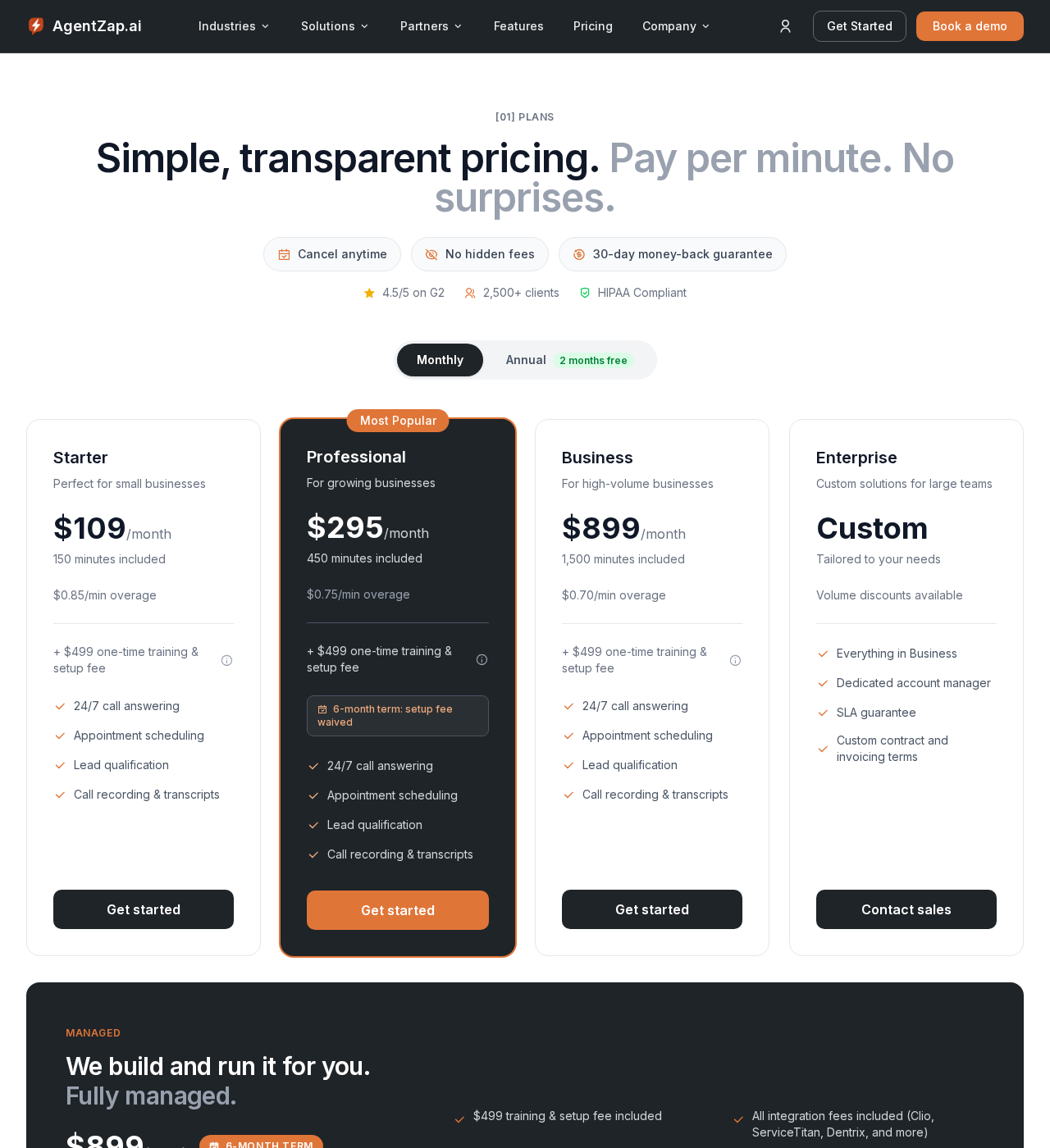
AgentZap is the automotive-native option in this list. It publishes a Tekmetric integration over the Tekmetric REST API — pulling repair statuses, checking appointment availability, and pushing captured customer data into the workflow — and third-party coverage credits it with Mitchell 1 and Shop-Ware connections as well (AgentZap; Stork). The agent is trained for shop vocabulary: it captures year, make, model, and mileage, handles status inquiries, and books appointments, and it can run full-time, after-hours, or overflow-only through your forwarding rules. Pricing verified September 25, 2026 (dated screenshot): Starter $109/month with 150 included minutes plus a $499 training and setup fee, Professional $295 (450 minutes, $0.75/min overage), Business $899 (1,500 minutes, $0.70/min), Enterprise custom; a fully managed tier runs $899/month on a six-month term, annual billing takes two months off, and there is a 30-day money-back guarantee. HIPAA compliance and bilingual answering are listed; the site claims 2,500+ clients and a 4.5 G2 rating. Note that third-party integrations like Clio, ServiceTitan, or Dentrix may carry extra setup work beyond the base fee.
Pricing for AgentZap as captured on September 25, 2026. This screenshot is retaken every Friday at 9:00 AM ET and replaced whether the price has changed or not.
Bland AI: best for technical owners building a fully custom call flow
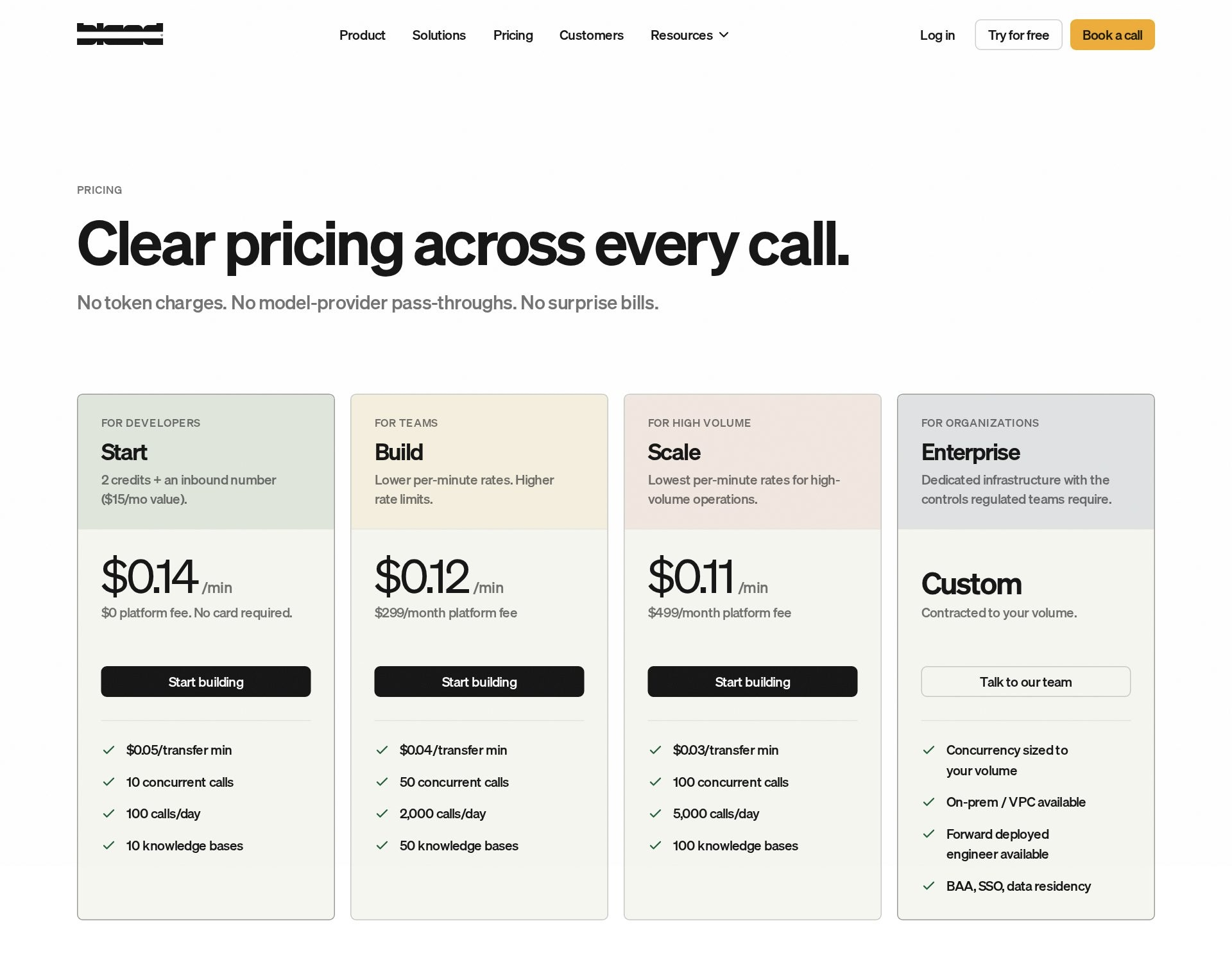
Bland AI is not a receptionist product; it is voice-AI infrastructure. Pricing verified September 25, 2026 (dated screenshot): the Start tier bills $0.14 per minute with a $0 platform fee (two credits and an inbound number included, no card required), Build drops to $0.12 per minute plus a $299/month platform fee, transfer time runs $0.05/minute, and Enterprise is custom. For that you get a fast API and total freedom — and you supply everything else: the conversation design for estimate versus status versus tow-in, the connectors into your shop-management system or CRM, the automotive vocabulary training, the error handling when an integration fails, and the compliance posture of your own backend. Latency is yours too: every external API call your build makes mid-conversation adds delay the caller can hear. Nothing shop-specific ships in the box — no estimate guardrails, no repair-order awareness, no canned tow-in script.
Pricing for Bland AI as captured on September 25, 2026. This screenshot is retaken every Friday at 9:00 AM ET and replaced whether the price has changed or not.
Dialzara: best for bilingual shops on a budget
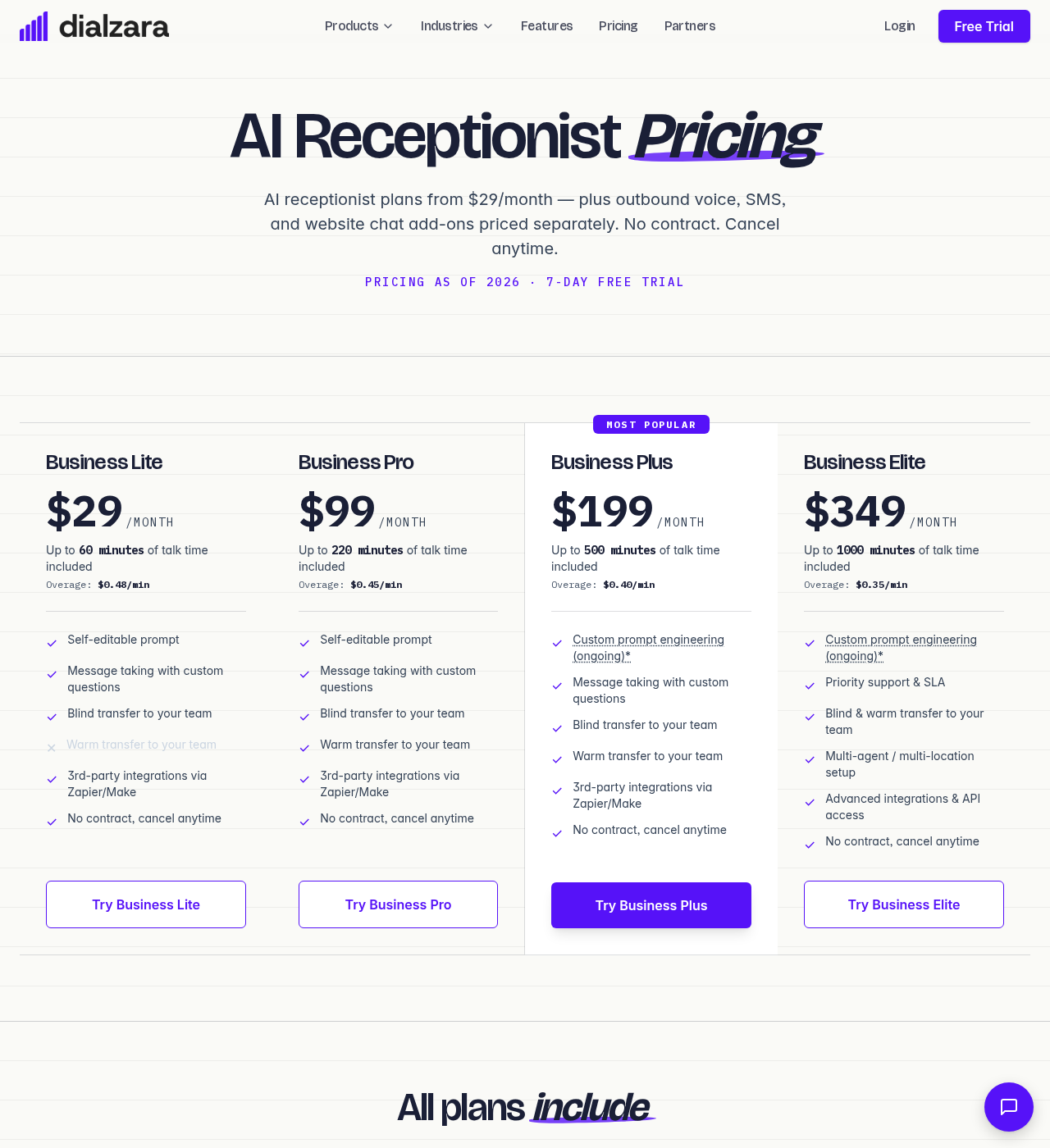
Dialzara is the incumbent in this query space — its own “10 Best Auto Repair Answering Services” listicle (May 19, 2026) ranks it first on a disclosed rubric, and we graded it on ours instead (Dialzara’s list). The product trains from your website URL in minutes, books appointments and takes blind transfers from the entry tier (warm transfers on Pro and up), and its automotive page covers the right shop behaviors: quotes only standard prices you authorize for common services, captures VIN and concern details for warranty and recall routing, gives pre-set per-vehicle status updates, and identifies fleet calls. Data moves to shop-management systems like Mitchell, Shop-Ware, and Tekmetric by email, SMS, or webhook — a push of captured intake, not a live read of your repair-order board. Pricing verified September 25, 2026 (dated screenshot): $29/month with 60 minutes ($0.48/min overage), $99 with 220 ($0.45), $199 with 500 ($0.40), $349 with 1,000 ($0.35); a website chatbot is $39/month standalone but free with any voice plan, and an AI SMS agent runs $19/month plus $0.05 a message. HIPAA compliance is advertised; there is a 7-day trial.
Pricing for Dialzara as captured on September 25, 2026. This screenshot is retaken every Friday at 9:00 AM ET and replaced whether the price has changed or not.
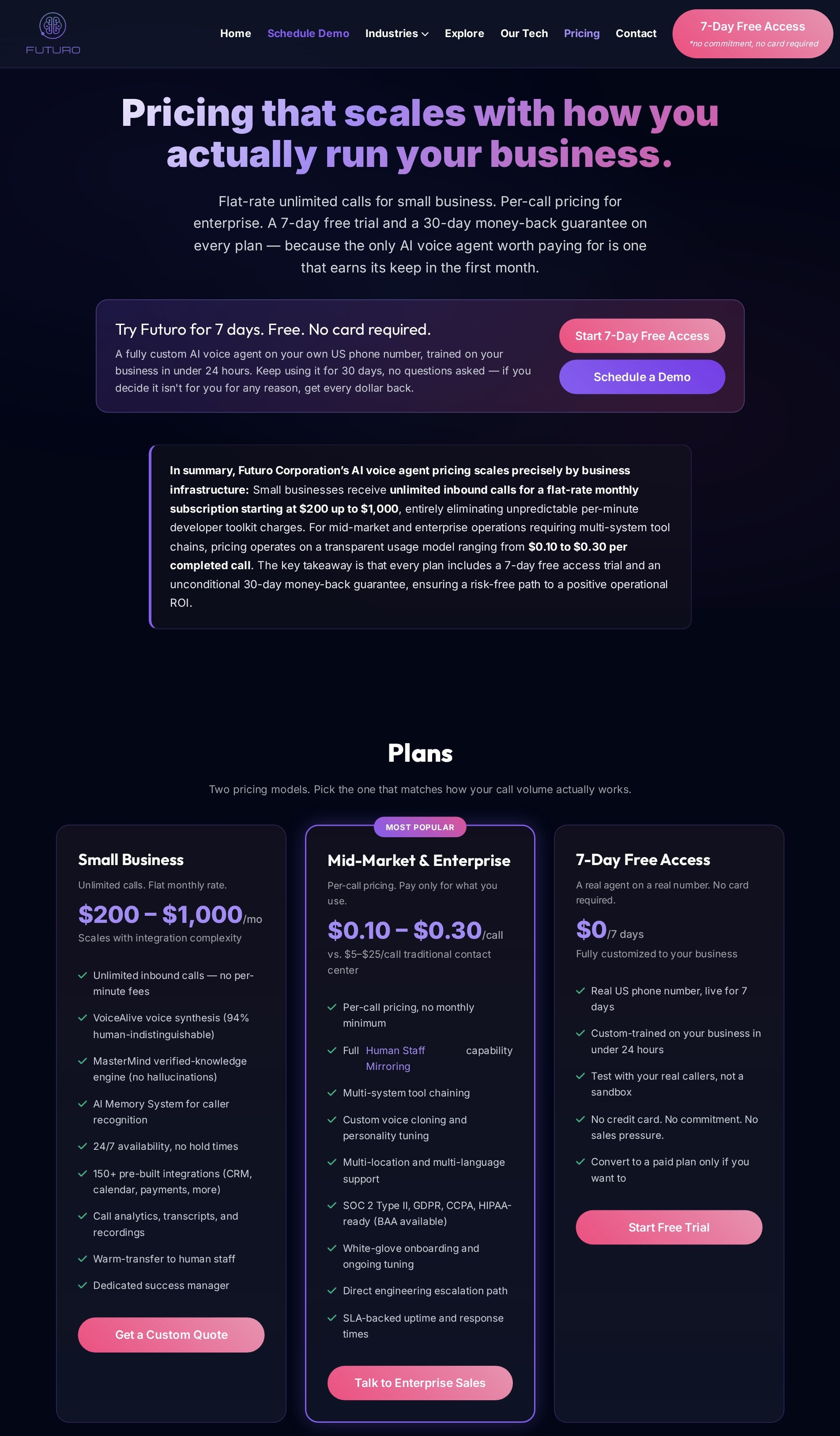
Futuro AI: best for flat-rate status-call automation with zero-hallucination estimates (our product)
Futuro AI is our product, so read this profile with that disclosed — it was graded on the same rubric as the other nine. Three things define it for an auto repair shop. First, estimate integrity: MasterMind answers price questions only from your approved service menu and declines everything outside it — the AI cannot invent a number, because it is architecturally constrained to what you published. Second, the status-call killer: connected to your workflow during a managed 24–48-hour setup, it answers “is my car ready?” from real status and pushes proactive outbound updates at the milestones you choose — the pattern that cut one dealership group’s inbound status calls 60%. Third, memory: the Futuro Memory System recognizes the household, not just the caller — the customer with three vehicles gets one continuous relationship, and bay- and technician-aware booking respects loaner and shuttle logic. VoiceAlive answers in 53 languages with mid-call switching, and in our 1,000-participant double-blind study (company-run, not peer-reviewed) listeners found it statistically indistinguishable from a human. Pricing verified September 25, 2026 (dated screenshot): $200/month flat for small business, unlimited calls, scaling to about $1,000/month with integration complexity; enterprise runs $0.10–$0.30 per completed call. Deploys to your existing number — full-time or overflow-only via conditional call forwarding — with a 7-day free trial, no card, and a 30-day money-back guarantee.
Pricing for Futuro AI as captured on September 25, 2026. This screenshot is retaken every Friday at 9:00 AM ET and replaced whether the price has changed or not.
Goodcall: best for multi-day jobs where the same customer calls repeatedly
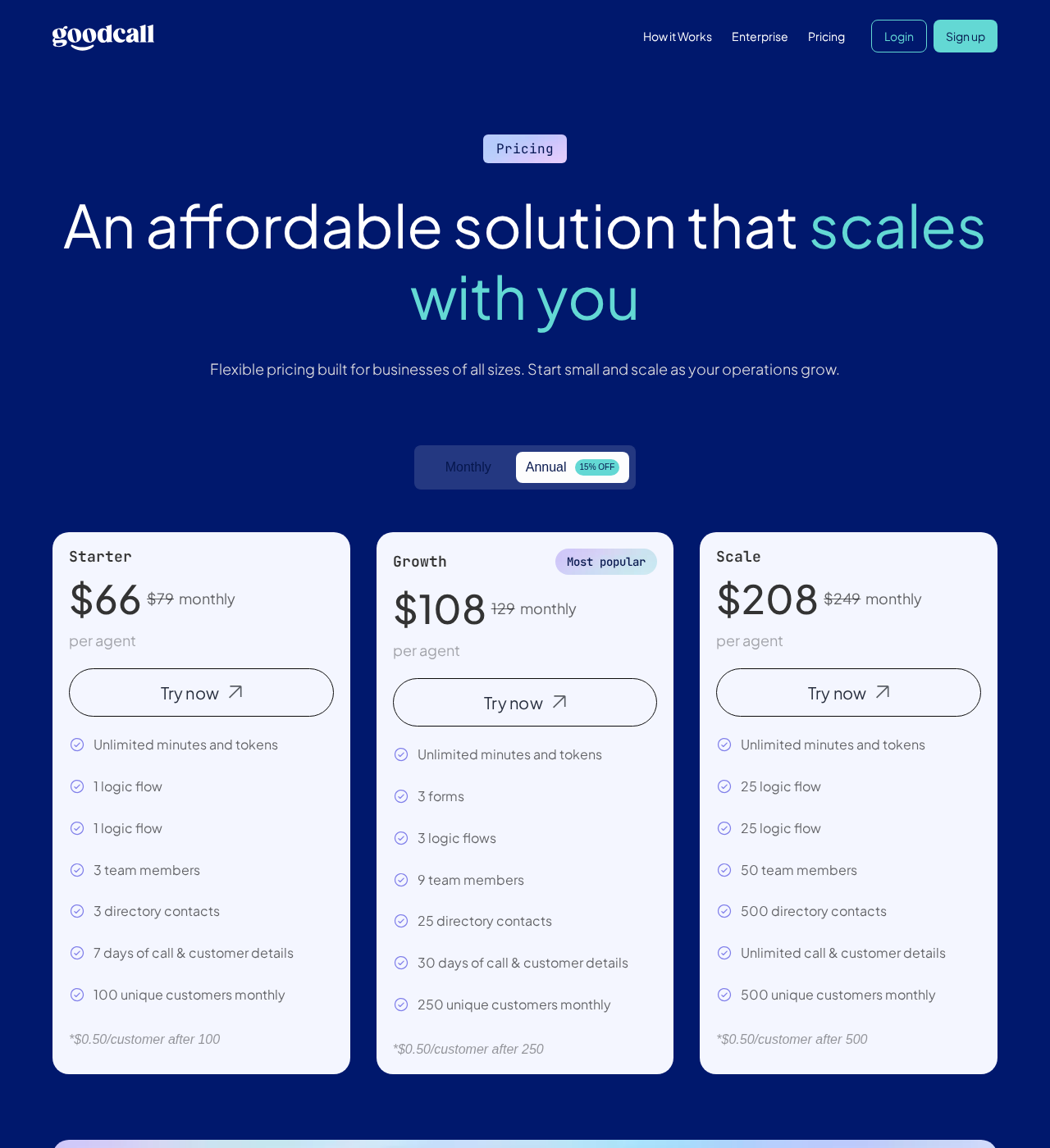
Goodcall’s billing unit is the unique customer, not the minute and not the call — and for this trade that is a genuinely different shape. A customer whose car is in for three days and rings four times is one billable customer here, versus four billable calls on a per-call plan; Voksha’s priced comparison flagged this exact wrinkle for shops (Voksha). Pricing verified September 25, 2026 (dated screenshot): Starter $79/month per agent with unlimited minutes and 100 unique customers ($0.50 per customer over), Growth $129 (250), Scale $249 (500), with annual billing at $66/$108/$208. The agent handles greetings, intake, FAQs, and routing, and connects outward through Zapier’s 9,000-app catalog — including Housecall Pro and Google Calendar paths — rather than any native shop-management connector we could verify (Zapier). Setup is template-driven and quick.
Pricing for Goodcall as captured on September 25, 2026. This screenshot is retaken every Friday at 9:00 AM ET and replaced whether the price has changed or not.
OnCallClerk: best for a free start with native calendar booking
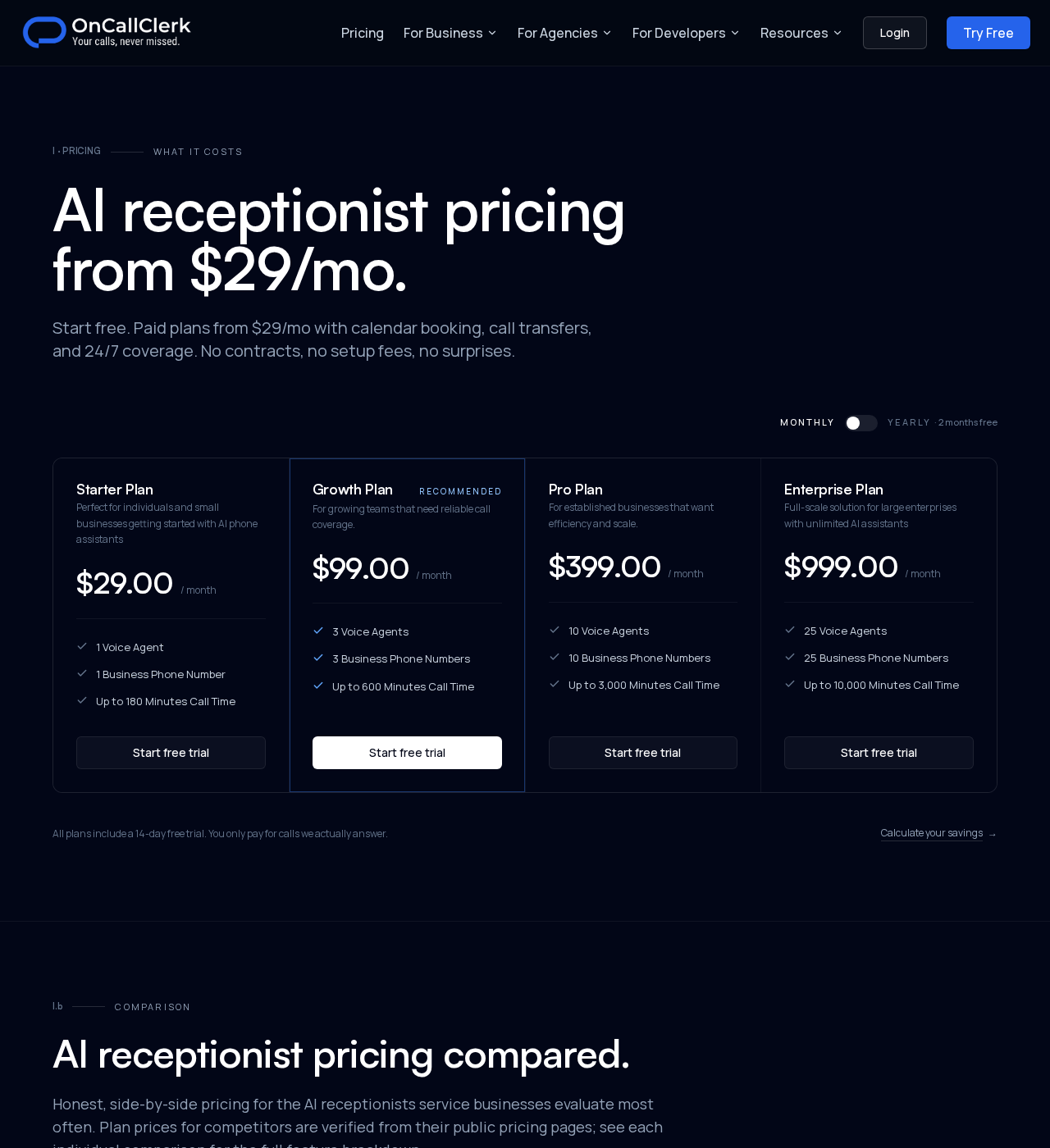
OnCallClerk leads with a genuinely free starter plan — an AI agent with a real phone number, no card required — and a paid ladder verified September 25, 2026 (dated screenshot): Starter $29/month (180 minutes, one agent), Growth $99 (600 minutes, three agents), Pro $399 (3,000 minutes, ten agents), Enterprise $999 (25 agents); every paid plan includes a 14-day trial and yearly billing takes two months off. The differentiator is architectural: Google Calendar, Sheets, and webhooks are first-class platform features, not paid Zaps, and availability lookups happen mid-call so the caller hears a confirmed slot, not “we’ll call you back” (OnCallClerk). A REST API and TypeScript SDK cover the developer path, and the company is explicit that your systems stay the source of truth. What you will not find published is a Tekmetric, Shopmonkey, or Mitchell 1 connector — the bridge would run through webhooks or the API.
Pricing for OnCallClerk as captured on September 25, 2026. This screenshot is retaken every Friday at 9:00 AM ET and replaced whether the price has changed or not.
Rosie: best for message-first coverage at low call volume
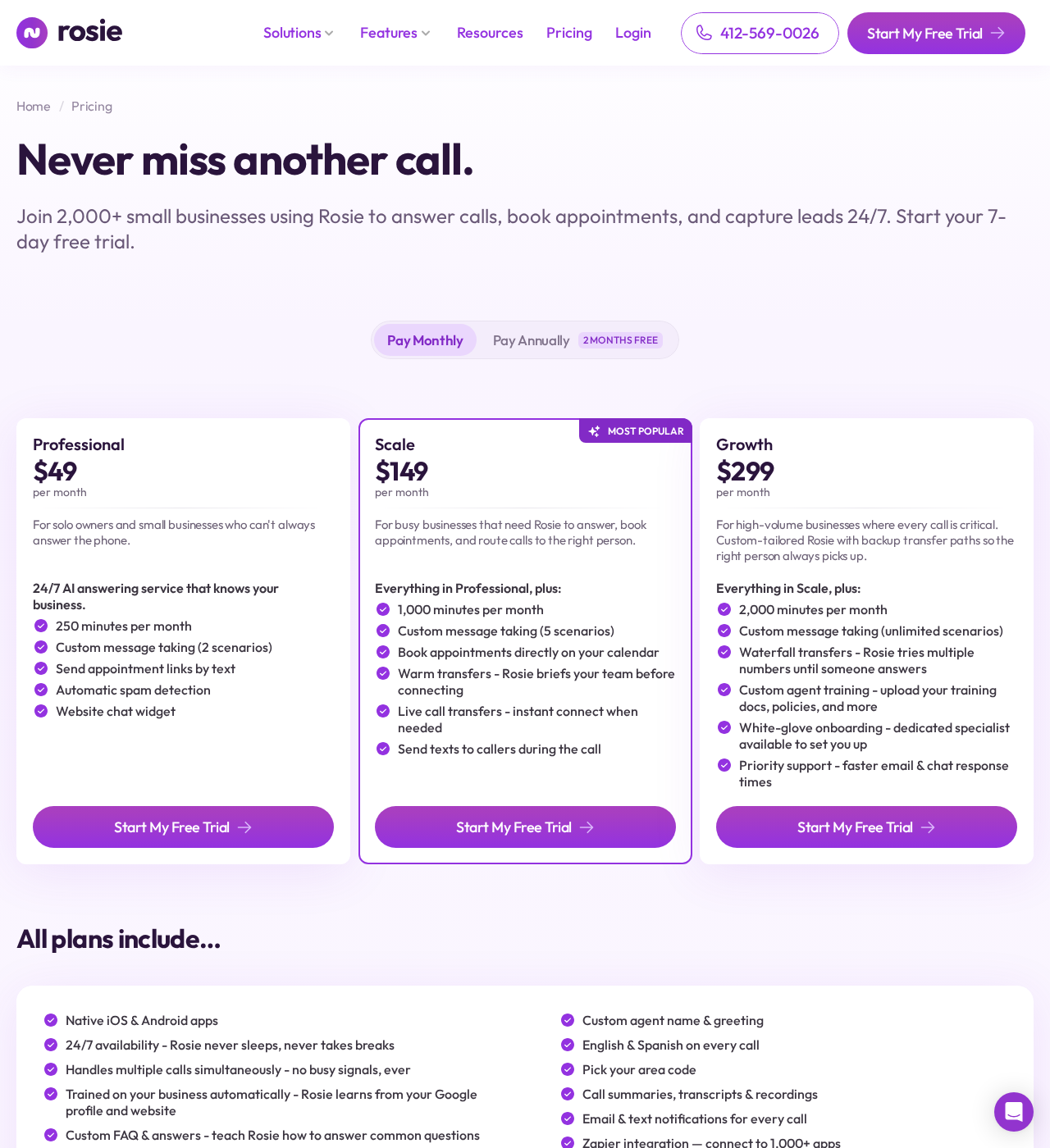
Rosie learns from your website and Google Business Profile (and from internal documents like a price list on higher plans), answers 24/7 in English and Spanish, and texts you an AI summary after every call. The catch is tier-gating: the $49/month Professional plan (250 minutes) answers and takes messages but cannot book appointments, transfer calls, or text links — real calendar booking into Google Calendar, Calendly, Acuity, or Appointlet starts on the $149 Scale plan (1,000 minutes), and native CRM connections wait for the $299 Growth plan (2,000 minutes) (Allo’s teardown). Pricing verified September 25, 2026 (dated screenshot), plus a $50/month Website Texting add-on (25 conversations). Zapier bridges everything else; no shop-management connector is published.
Pricing for Rosie as captured on September 25, 2026. This screenshot is retaken every Friday at 9:00 AM ET and replaced whether the price has changed or not.
Smith.ai: best for live human backup behind the AI
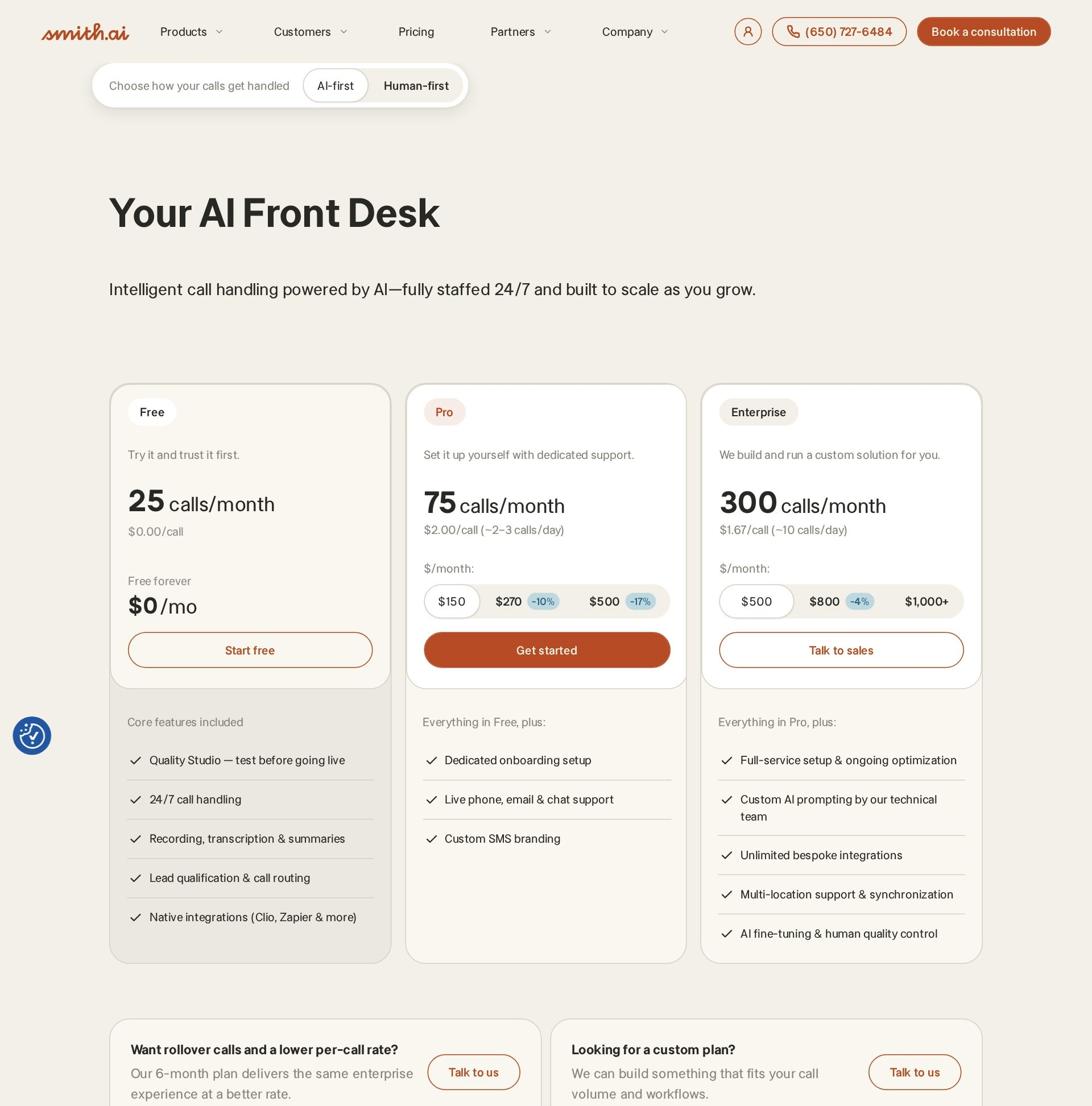
Smith.ai is the hybrid: AI receptionists in front, live North America-based agents behind them, and the only free tier here that is genuinely usable — $0 for 25 calls a month ($3.00/call after). Pricing verified September 25, 2026 (dated screenshot): AI Pro $150/month at $2.00 per call, AI Enterprise $500/month at $1.67 per call; human virtual receptionists run $300/month for 30 calls ($11.50/call overage), $810 for 90, $2,100 for 300. The automotive page covers the right ground: custom call flows by caller intent (new inquiry versus warranty versus parts), bilingual AI and agents, appointment scheduling, spam blocking, and call intelligence with recordings and transcripts. Integrations run 5,000+ deep via Zapier with the first CRM connection free ($0.50/call per additional one). A 30-day money-back guarantee applies.
Pricing for Smith.ai as captured on September 25, 2026. This screenshot is retaken every Friday at 9:00 AM ET and replaced whether the price has changed or not.
Synthflow: best for dealer groups on enterprise contracts
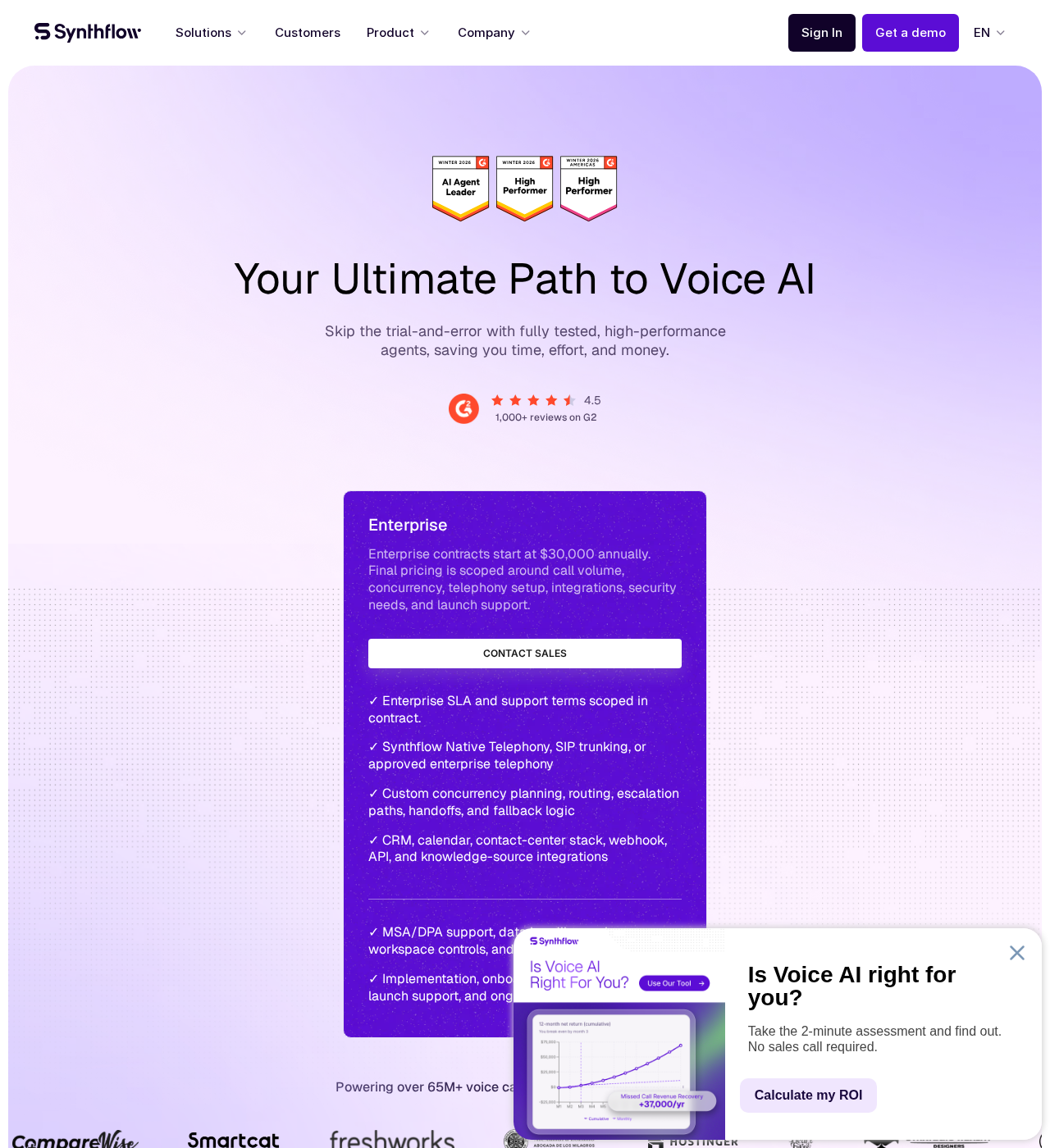
Synthflow is the enterprise platform in the list: custom voice agents, API-key-driven automation, and a Zapier app whose actions cover bookings, transfers, SMS, and structured extraction (Synthflow docs). Pricing verified September 25, 2026 (dated screenshot): enterprise contracts start at $30,000 a year, scoped around call volume — there is no published self-serve tier to pilot. For a dealer group standardizing intake across rooftops, that buy can pencil; Dialzara’s listicle likewise slots Synthflow as an AI option that takes shop-supplied scripts for collision-specific intake. For a single independent shop, the economics simply point elsewhere on this list.
Pricing for Synthflow as captured on September 25, 2026. This screenshot is retaken every Friday at 9:00 AM ET and replaced whether the price has changed or not.
Upfirst: best for the lowest-commitment real pilot
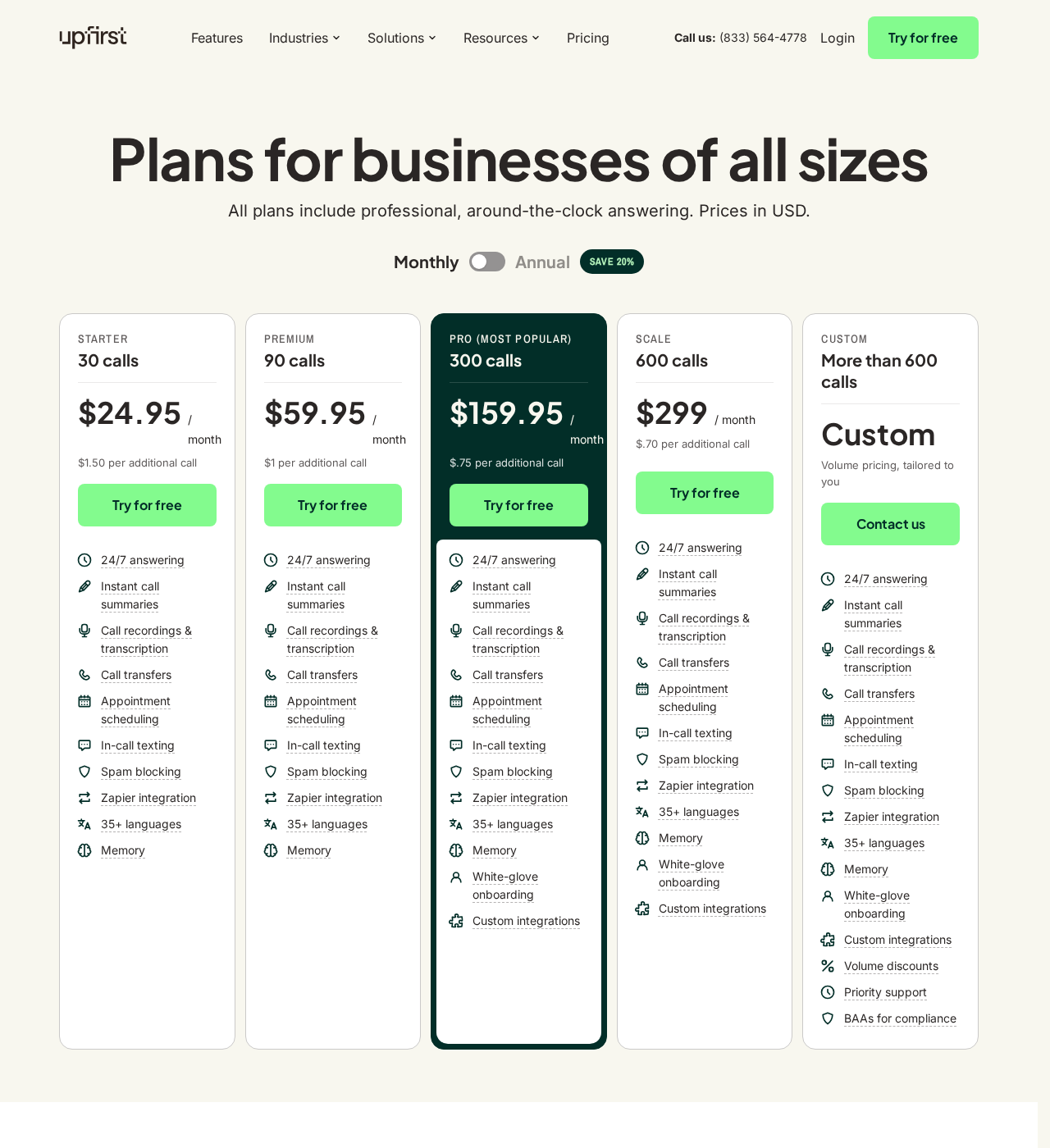
Upfirst’s pitch is radical tier equality: every plan, including the $24.95 Starter (30 calls, $1.50/call over), includes 24/7 answering, instant texted summaries, warm transfers, calendar booking (Google, Outlook, Clio, Acuity, Calendly), in-call texting, 35+ languages, repeat-caller memory, and spam blocking — and spam, robocalls, and sub-15-second calls never count against your plan. Pricing verified September 25, 2026 (dated screenshot): Premium $59.95 (90 calls, $1.00/call), Pro $159.95 (300 calls, $0.75), Scale $299 (600 calls, $0.70); annual billing saves 20%, and the 14-day trial needs no card. Third-party reviews are early but strong (G2 4.9 on 18 reviews, Capterra 5.0 on 5, per the company’s own roundup). Zapier covers CRM handoffs; no shop-management connector is published.
Pricing for Upfirst as captured on September 25, 2026. This screenshot is retaken every Friday at 9:00 AM ET and replaced whether the price has changed or not.
If you run Shopmonkey, Tekmetric, Mitchell 1, or something else — what actually connects?
The integration question decides this purchase more often than any feature list, and it is where vendor marketing gets vague. The honest map, platform by platform, as of September 25, 2026 — including the gaps, because a documented gap is more useful than an invented connector.
| Vendor | Published shop-management connector | Books into a calendar mid-call | Zapier / API / webhook path |
|---|---|---|---|
| AgentZap | Tekmetric (REST API, vendor-published); Mitchell 1 and Shop-Ware credited by third parties | Yes, via integration | Integration setup fees may apply |
| Bland AI | None — build your own on the API | Only if you build it | Full API; everything DIY |
| Dialzara | None native; pushes intake to Mitchell / Shop-Ware / Tekmetric by webhook, email, or SMS | Yes, from the entry tier | Zapier on all plans |
| Futuro AI (our product) | By managed integration setup (24–48h) — confirm your SMS scope in the demo | Yes | 150+ integrations, configured for you |
| Goodcall | None published | Limited; flow-based | Zapier (9,000 apps) |
| OnCallClerk | None published | Yes — native Google Calendar | Native webhooks, REST API, TypeScript SDK |
| Rosie | None published | From Scale ($149) only — Google, Calendly, Acuity, Appointlet | Zapier |
| Smith.ai | None published for shop management; CRM-first | Yes (add-on fee) | Zapier (5,000+ apps); first CRM free |
| Synthflow | Enterprise-scoped | Via custom actions | Zapier app + API keys |
| Upfirst | None published | Yes — Google, Outlook, Clio, Acuity, Calendly | Zapier to 195+ CRMs |
If you run Tekmetric
Tekmetric exposes a REST API, and AgentZap is the one vendor in this list that publishes a native connector against it — repair-status reads, availability checks, and customer-data writeback. Everyone else reaches Tekmetric indirectly: Zapier where triggers exist, webhooks where your account tier allows. Tekmetric’s own pricing runs $199/$349/$439 a month, with two-way texting gated to the $439 Scale tier (comparison). Whichever AI you trial, make the demo book a real appointment into your Tekmetric instance — no re-typing.
If you run Shopmonkey
Shopmonkey offers a public API and webhooks (“integrate with nearly any application”) (Shopmonkey), yet no AI receptionist in this list publishes a native Shopmonkey connector as of September 25, 2026. The workable bridges: Dialzara’s webhook push, OnCallClerk’s native webhooks, or Futuro AI’s managed setup. Shopmonkey plans run $239/$399/$499 a month plus $20 per added user, with texting unlimited from the entry tier (Shopmonkey’s own comparison).
If you run Mitchell 1
Mitchell 1 Manager SE is the legacy heavyweight with quote-only pricing and texting as a separate MessageCenter add-on (Shopmonkey). There is no modern public API story, so expect the AI to hand off intake by email or SMS for an advisor to key in — Dialzara’s automotive page explicitly names Mitchell compatibility on exactly those terms. AgentZap is credited with a Mitchell 1 connection by third-party coverage; verify the mechanism directly with them.
If you run Shop-Ware
Shop-Ware starts at $279 a month with unlimited users, and unlimited two-way texting arrives at the $389 Pro tier (Shopmonkey’s comparison). Dialzara names Shop-Ware on its automotive page for webhook/email/SMS handoff, and third-party coverage credits AgentZap with a connector. We could not verify any other published Shop-Ware integration among the ten — treat anything beyond those two as a custom project.
If you run AutoLeap
AutoLeap is the one shop-management system here that sells its own AI receptionist: a $99/month add-on to a platform that runs $199/$349/$449 (Garage’s comparison). That changes the decision — before buying a third-party AI and bridging it, price the native add-on and compare what it actually answers. AutoLeap onboards by custom-building your instance, so there is no self-serve trial to shortcut the evaluation.
If you run Shop Boss
Shop Boss is a smaller platform, and here is the honest finding: we could not verify a published connector from any of the ten AI vendors, and Shop Boss’s own integration catalog is limited. The realistic path is calendar-first — book into Google Calendar through OnCallClerk, Rosie (Scale), or Upfirst, or have Futuro AI scope a managed connection. Ask Shop Boss support what API or webhook access your subscription includes before signing anything.
If you run ALLDATA
ALLDATA is diagnostics, estimating, and OEM repair information — not a scheduler — so there is nothing for a phone AI to book into. No vendor in this list integrates with ALLDATA, and none should claim to. Your appointment book lives elsewhere (Google Calendar, a paper diary, a lighter SMS); pick the AI that matches where the calendar actually is, and keep ALLDATA for the bays.
If you run no shop-management system at all
A paper-and-whiteboard shop — more common than the software industry admits — should buy calendar-first: OnCallClerk’s native Google Calendar booking on a free plan, Upfirst’s included booking from $24.95, or Rosie from $149. The AI becomes your first real system of record, which is fine — just know that when you eventually adopt Tekmetric or Shopmonkey, you will re-do the integration conversation with whichever tool you picked.
Methodology: what we did, what we read, and who else covers this space
Selection. The brief for this guide started from ten candidates; four (AInora, Lineshift, Phonely, My AI Front Desk) were replaced because they are absent from our Friday-verified pricing-screenshot system, and we do not publish prices we cannot show. The final ten — AgentZap, Bland AI, Dialzara, Futuro AI, Goodcall, OnCallClerk, Rosie, Smith.ai, Synthflow, Upfirst — span every pricing shape in the category: per-minute, per-call, per-unique-customer, flat, and enterprise contract.
Grading. The eight-criterion rubric above was fixed before scoring and weights what decides a real shop purchase: status-call and estimate integrity and integration depth at 20% each, call-mix coverage and pricing behavior at 15% each, surge handling at 10%, language coverage at 8%, setup burden at 7%, and evidence at 5%. Sources of record: each vendor’s live pricing page (September 25, 2026), vendor documentation, shop-management API pages, and third-party comparisons, all listed in Sources cited. Futuro AI was scored on the same rubric; our conflict is disclosed at the top of this page and in every Futuro paragraph.
Who else covers this space. Three buying guides predate this one and are worth reading: Dialzara’s “10 Best Auto Repair Answering Services in 2026” (May 19, 2026) — the incumbent, self-ranked first on a disclosed rubric, and notably broader than ours because it includes human answering services; Voksha’s priced four-option comparison (September 8, 2026), which contributed the per-customer-versus-per-call insight for multi-day jobs; and Stork’s dealer-and-repair overview (July 15, 2026), the best map of the dealer-native platforms we deliberately excluded. AgentZap’s Tekmetric page (September 8, 2026) is vendor content we used for its integration claims and flagged as such.
Corrections. Spot a stale price or a connector that shipped since September 25? Email editorial@futurocorp.com — our corrections policy governs fixes, and pricing screenshots re-verify every Friday regardless.
Where these prices come from
Every price on this page was read from the vendor’s own public pricing page on September 25, 2026, and is backed by a dated screenshot retaken every Friday at 9:00 AM ET on our vendor pricing index:
- AgentZap — agentzap.ai/pricing (screenshot)
- Bland AI — bland.ai/pricing (screenshot)
- Dialzara — dialzara.com/pricing (screenshot)
- Futuro AI — futurocorp.com/pricing (screenshot)
- Goodcall — goodcall.com/pricing (screenshot)
- OnCallClerk — oncallclerk.com/pricing (screenshot)
- Rosie — heyrosie.com/pricing (screenshot)
- Smith.ai — smith.ai/pricing and smith.ai/pricing/ai-receptionist (screenshot)
- Synthflow — synthflow.ai/pricing (screenshot)
- Upfirst — upfirst.ai/pricing (screenshot)