

Editorial Disclosure: This guide is published by Futuro Corporation, and Futuro AI is one of the six receptionists compared. Futuro has no financial, affiliate, or referral relationship with the other vendors named here, including Housecall Pro, and no vendor paid for inclusion. All pricing and integration claims were verified against the vendors’ own pages on October 13, 2026. Beyond this article, we document pricing for every vendor we cover — and every vendor we come across: a dated screenshot of each vendor’s pricing page is retaken every Friday at 9:00 AM ET as direct evidence of what they charge, currently for more than 70 vendors, at futurocorp.com/vendor-pricing. Full methodology.
A homeowner is standing in a kitchen with water coming through the ceiling, or listening to a furnace quit at 58°F, and they are calling your shop. The only question this page grades is what exists in Housecall Pro when that call ends: a real job, booked and dispatched, or a summary email somebody retypes at 7 AM. The right pick depends on how much of the call has to land inside Housecall Pro live, and on whether your shop needs Spanish and a predictable bill in a freeze or heat week.
If you have not chosen your field-service platform yet, this page is the wrong deep end — read our full plumber comparison or our full HVAC AI receptionist comparison first; they grade ten and nine vendors respectively on triage, pricing behavior, and job creation across platforms. This page is narrower and deeper: you already run Housecall Pro, and you want to know what each receptionist writes into it. One more thing worth knowing before you shop: Housecall Pro’s own August 2026 roundup lists CSR AI, Smith.ai, Goodcall, Ruby, and Quo — and states in its decision section, “We haven’t tested call quality hands-on.” We grade the five Housecall Pro-specific outcomes below and publish the four scripted calls we run against every vendor as a reusable protocol.
About this guide: how is this comparison judged?
The six receptionists are listed alphabetically, not ranked, and there is no overall winner: a Housecall Pro shop that needs zero setup, one that needs Spanish every day, and one that needs a fixed bill in a freeze week are buying different things, so no vendor wins every category. Every vendor, ours included, gets the same profile structure with a “Best for” line and an honest trade-off. Futuro AI (our product) is one of the six, and we say plainly where it is a good option and where it is not. External sources are linked at the claim, and every price is re-checked weekly against a dated screenshot on our vendor pricing index.
Who is this guide for, and when should you read our plumber or HVAC guide instead?
This guide is for owners and office managers at plumbing and HVAC companies who already run Housecall Pro and want the receptionist question answered inside that decision: what lands in HCP during the call, what happens to the on-call tech at 2 AM, what the agent does when asked for a price, whether it speaks Spanish, and what the invoice does in a surge week. One URL serves both trades; plumbing and HVAC examples alternate in every section, because the Housecall Pro mechanics are identical and only the call mix changes.
If you are still comparing platforms, or want the broader vendor field graded on triage and pricing across every FSM, those are different pages: our full plumber comparison covers ten options on burst-pipe triage, and our full HVAC AI receptionist comparison covers nine on heat-wave pricing and ServiceTitan/HCP booking. This page deliberately re-derives none of that. It is not for shops evaluating outbound or cold-call tooling — everything here is inbound, and Futuro’s own outbound guidance says it is the wrong product for cold campaigns anyway.
What did we grade? The five Housecall Pro tests
Every criterion on this page passes one filter: would this matter if the shop didn’t run Housecall Pro? If not, it’s here; if yes, it belongs to the general guides linked above. Five criteria, weighted before any vendor was profiled, assessed pass / partial / fail with notes from documentation — and never reduced to a published score:
| Criterion | Weight | What a pass looks like |
|---|---|---|
| Live job creation in Housecall Pro | 30% | A job, appointment, or customer record exists in HCP before the caller hangs up — not a summary email someone retypes at 7 AM. |
| After-hours emergency paging | 20% | The 2 AM burst pipe reaches the on-call tech inside the call — page or warm transfer with address and problem captured — per your rotation. |
| Price-book-only quoting | 20% | Quotes come only from your configured price book; anything not in it routes to an estimate instead of an invented number. |
| Spanish | 15% | Documented Spanish answering, at a tier and price you can actually buy — not a marketing checkbox or a “coming soon.” |
| Surge-week billing | 15% | You can predict the invoice in a freeze or heat week before it arrives — flat, or metered with the meter spelled out. |
A note on register: “writes into Housecall Pro” covers three mechanically different things on this page — CSR AI is Housecall Pro; Smith.ai documents a native, self-serve connection that writes after the call; Futuro AI’s full native integration is live and tested; and Zapier or Make paths (Dialzara, Goodcall, Rosie) are general-purpose plumbing the shop maintains itself. We keep those registers separate everywhere rather than blur them into one checkmark.
Which Housecall Pro AI receptionist fits which shop? The decision table
Alphabetical, unranked. One row per vendor in this article, ours included.
| Provider | Pricing | Standout attribute | Best fit | HCP write path |
|---|---|---|---|---|
| Dialzara | $29/mo (60 min); $99/mo Pro (220 min, $0.45/min over) | Bilingual EN/ES with after-hours escalation rules from the Pro tier | Budget-first shops comfortable owning a Zapier or Make connection | Zapier/Make; API on Elite |
| Futuro AI (our product) | $200/mo flat, unlimited inbound calls | Full native Housecall Pro integration, high-end voice realism, and caller memory by phone number in 53 languages | Shops with daily Spanish calls that need the same bill in a freeze week | Full native integration |
| Goodcall | $79/mo (100 unique callers, then 79¢ each) | Bills per unique caller, so repeat callers in a surge do not add cost | Routine English-language intake with predictable billing | Zapier / external tools |
| Housecall Pro CSR AI | Not published; sales-quoted add-on on a Housecall Pro plan (from $59/mo) | Built into Housecall Pro, so it reads jobs, services, and the price book with zero setup | Shops whose only requirement is zero setup inside Housecall Pro | Native, built in |
| Rosie | $49/mo (250 min); $149/mo Scale; $299/mo Growth | English and Spanish on every plan | Bilingual answering at the lowest entry price | Zapier, Create Customer only |
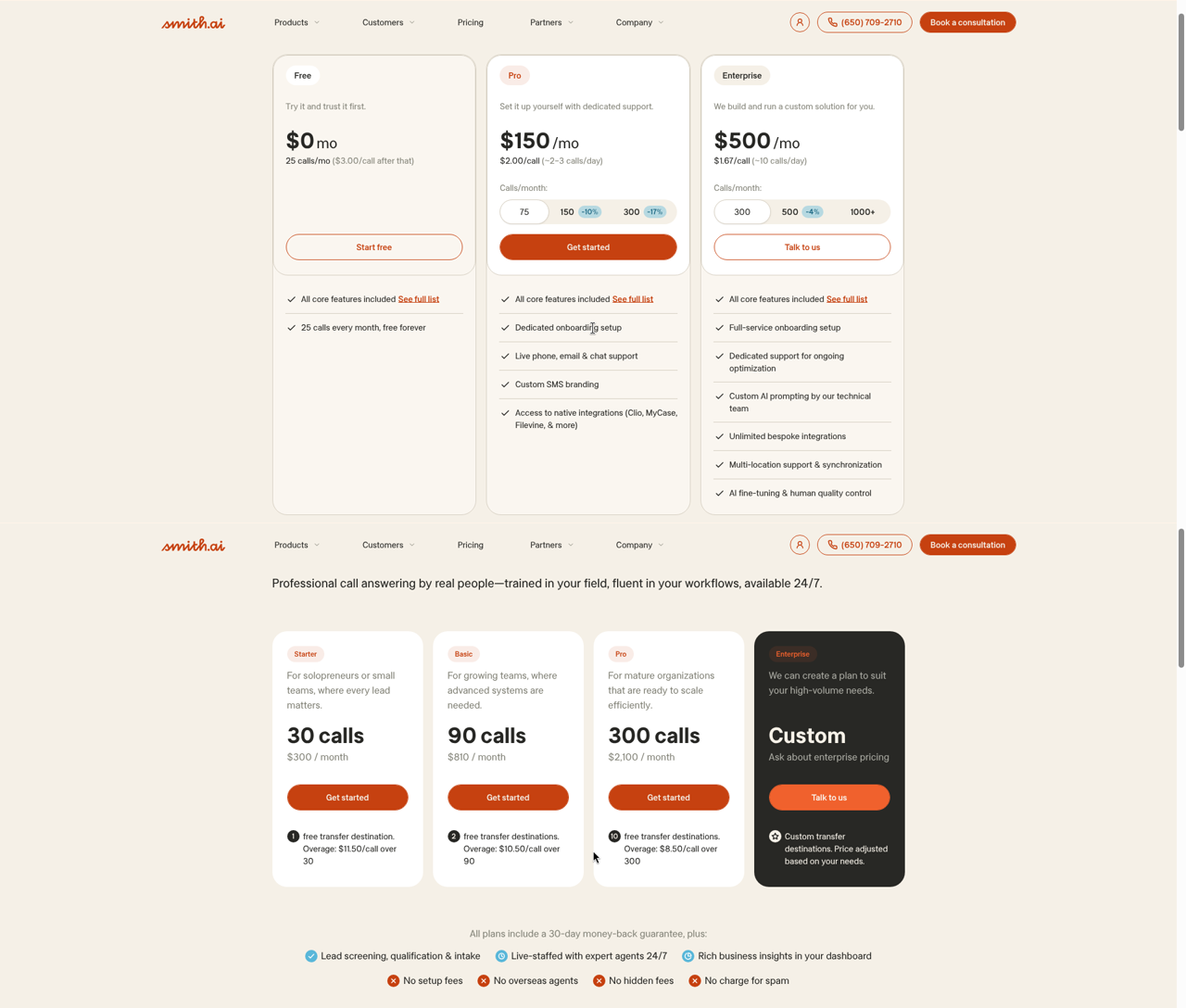
| Smith.ai | Free (25 calls, $3/call after); Pro $150/mo (75 calls); Enterprise $500/mo (300 calls) | Live North America-based human backup behind the AI | Shops that want a human to take over calls the AI cannot handle | Native (documented), post-call writes |
Prices are verified entry points as of October 14, 2026, not endorsements of the cheapest tier. Dated screenshots for each vendor live on our vendor pricing index. CSR AI has no public price to screenshot; that absence is the finding, not an estimate.
Which receptionists actually write into Housecall Pro?
The grid below is the whole buying question in one table: after a call, what exists in your Housecall Pro account? Every cell is graded from vendor documentation or official integration listings — not vendor conversations — and the “how we verified” column names the source. Anything we could not find in writing is marked “not documented,” which is itself a finding: if the vendor doesn’t publish it, you can’t hold them to it.
| Receptionist | Customer record | Job / estimate | Appointment | Call notes | How verified (Oct 13, 2026) |
|---|---|---|---|---|---|
| Housecall Pro CSR AI | Native | Native — “Book jobs and estimates” permission (help docs contradict themselves on live status) | Native — schedules onto your calendar | Call log; optional private-note logging after hours | HCP Help Center, CSR AI Overview |
| Smith.ai | ✓ — mapped to existing or new records, post-call | Via online-booking flow, not a direct job write | ✓ — booked through your HCP online-booking link | ✓ — summaries logged to the account | Smith.ai integration page + setup docs |
| Rosie | ✓ — via Zapier “Create Customer” (only HCP action listed) | ✗ — no job action on the listing | Books on its own calendar sync, not into HCP | ✗ — not on the listing | Zapier Rosie + Housecall Pro listing |
| Dialzara | Via Zapier/Make workflows you build | Not documented | Syncs Google/Outlook calendars, not HCP | Not documented | Dialzara pricing page feature matrix |
| Goodcall | Via Zapier / external tools you configure | Not documented | Not documented | Not documented | Goodcall pricing page + FAQ |
| Futuro AI | ✓ — full native integration | ✓ — full integration; live with active client accounts | ✓ — full native integration | ✓ — call summaries with memory of returning callers | Futuro pricing, onboarding process & live client deployments (publisher’s own) |
Read the registers, not just the checkmarks: “native” (CSR AI, Smith.ai) means a documented, maintained connection; “full native” (Futuro AI) means a full integration, live and tested with active client accounts and switched on during onboarding; “via Zapier” means you own the middleware, the polling delay, and the Zapier subscription.
How do the six receptionists compare, vendor by vendor?
Alphabetical order, same structure for each: what it costs, what it writes into Housecall Pro, and one honest trade-off. Pricing screenshots are dated and retaken weekly on our public index; CSR AI has no published price, so there is nothing to screenshot — that absence is graded as the finding.
1. Dialzara
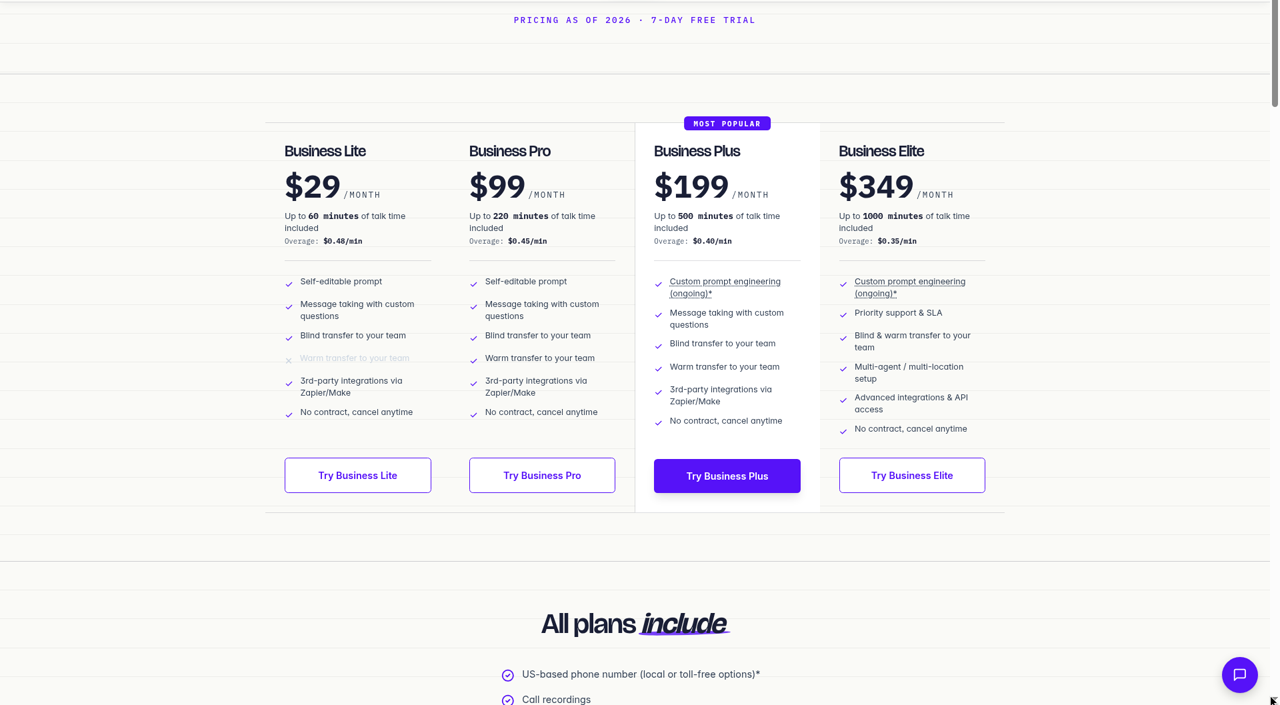
Dialzara’s Lite plan is $29 a month for 60 minutes ($0.48 per overage minute), but the feature matrix is the real price list: bilingual English–Spanish answering, warm transfers, after-hours rules and escalation, and Google/Outlook calendar sync all start at the $99 Pro tier (220 minutes, $0.45 overage; Plus is $199 for 500, Elite $349 for 1,000), pricing verified October 13, 2026 (dated screenshot). For Housecall Pro shops, the write-path is the limitation to price in: Dialzara connects to CRMs through Zapier/Make, with API access reserved for Elite, so any job creation in HCP is a workflow you build and maintain. The surge-week fact worth quoting from its own pricing FAQ: when included minutes hit zero, callers go straight to voicemail unless you’ve bought more minutes or turned on auto-recharge — in a freeze week, that’s the exact moment you can’t afford a dead line.
Pricing for Dialzara as captured on October 13, 2026. This screenshot is retaken every Friday at 9:00 AM ET and replaced whether the price has changed or not.
2. Futuro AI
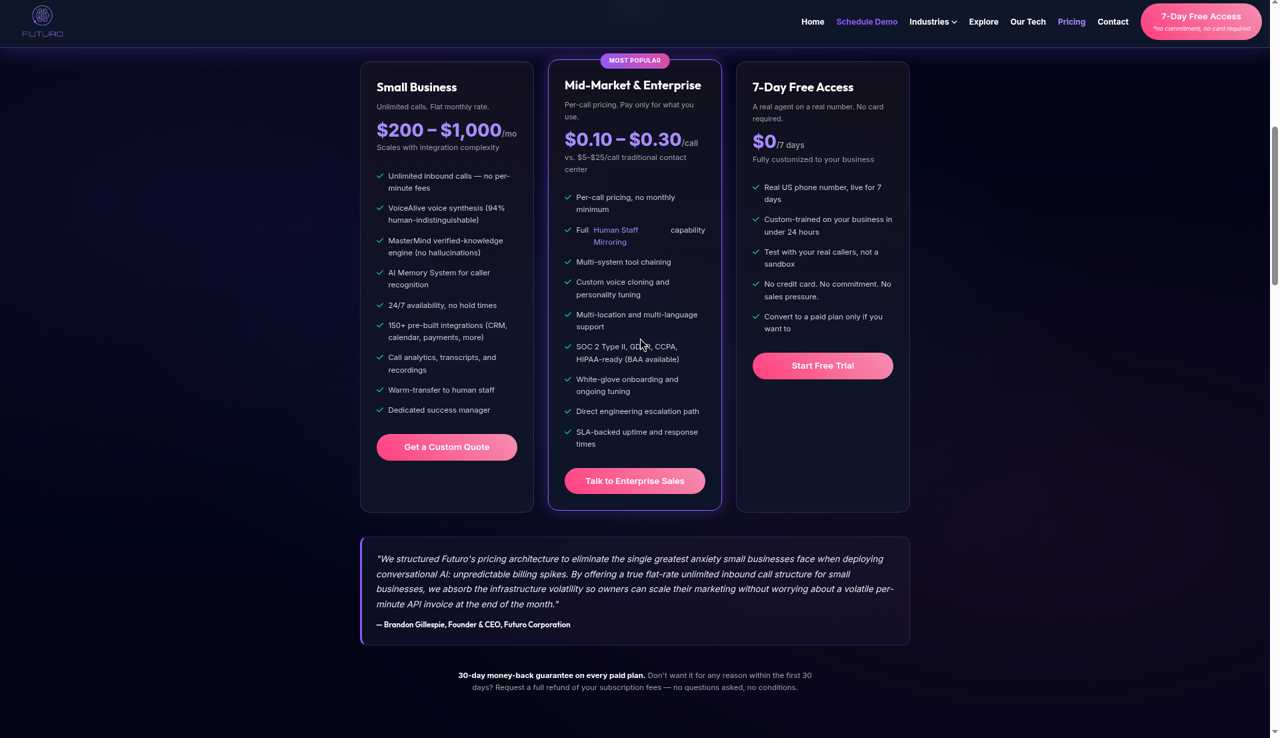
Futuro AI is $200 a month flat for unlimited inbound calls, pricing verified October 13, 2026 (dated screenshot), with mid-market and enterprise volume at $0.10–$0.30 per completed call — and a 7-day free access period, no card required, on every plan. Futuro AI has a full native Housecall Pro integration, live and tested with active client accounts and switched on during the managed 24–48-hour onboarding: your price book, services, and escalation rules are loaded so the agent quotes only from what’s in the book and says “a tech will confirm on site” when it isn’t — that constraint comes from the MasterMind retrieval layer, built over three years of R&D, which answers from configured knowledge rather than generating, for zero hallucination on prices (the engineering write-up). VoiceAlive answers in 53 languages with per-turn switching when the caller code-switches; English and Spanish are the deepest-tested pair, and the company publishes that limitation itself. The voice carries a 94% human-indistinguishability rating from a company-run, double-blind, 1,000-participant study (methodology and caveats) — company-run and not peer-reviewed, and it measured an English ISP support call, so don’t extend it to Spanish; run your own test calls. Returning callers are recognized by the memory system, which is what makes “where is my tech” answerable from appointment context. See Futuro for the trades for the plumbing/HVAC-specific configuration.
Pricing for Futuro AI as captured on October 13, 2026. This screenshot is retaken every Friday at 9:00 AM ET and replaced whether the price has changed or not.
3. Goodcall
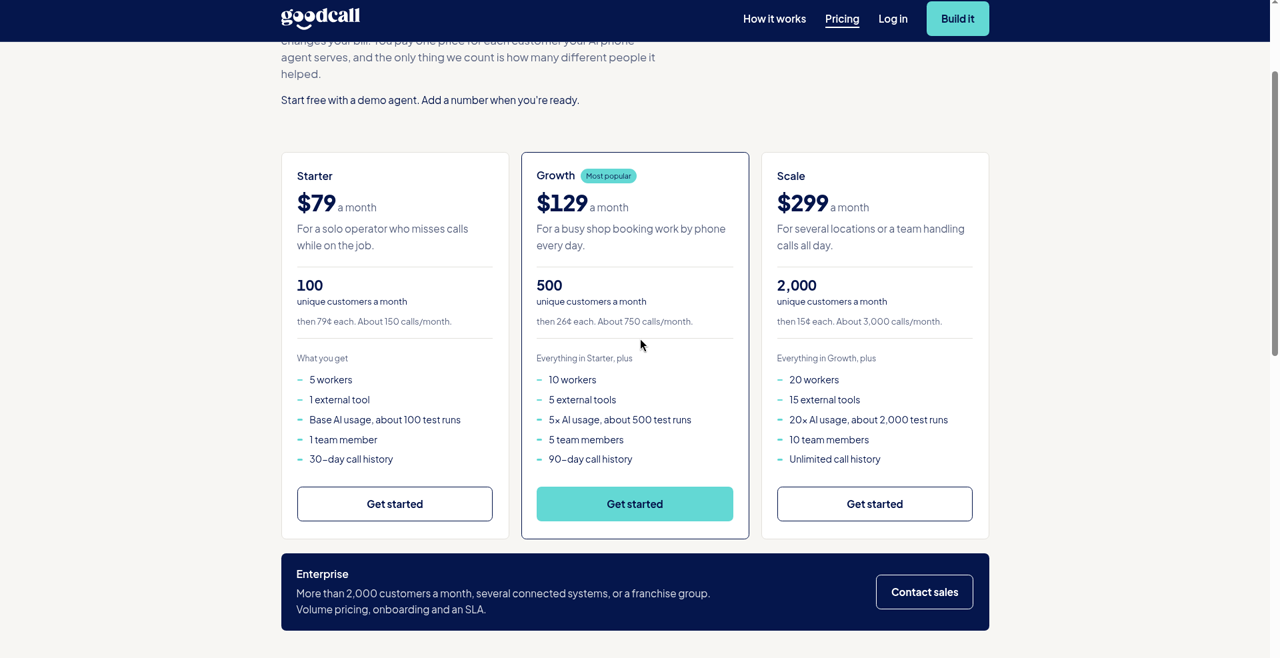
Goodcall bills by unique customer, not by minute: Starter is $79 a month for 100 unique customers (then 79¢ each), Growth $129 for 500 (then 26¢), Scale $299 for 2,000 (then 15¢) — pricing verified October 13, 2026 (dated screenshot). Its pricing FAQ is unusually clear about surge behavior: “Nothing breaks. Extra customers bill at your plan’s own rate” — no penalty pricing when a heat wave hits. For Housecall Pro, though, there is no documented native connection; integrations run through Zapier or external tools you configure, and we found no published Spanish capability on its pricing or FAQ pages on our check date — confirm both with the vendor before counting on either.
Pricing for Goodcall as captured on October 13, 2026. This screenshot is retaken every Friday at 9:00 AM ET and replaced whether the price has changed or not.
4. Housecall Pro CSR AI
CSR AI is Housecall Pro’s own answering layer, and the native advantages are real: the Permissions tab documents booking jobs and estimates, rescheduling, and canceling; escalation rules include a separate after-hours number for your on-call line; emergency handling is always on (forward the call or send a text alert); and the Customization tab lets you define how CSR handles pricing questions — against your actual price book, not a trained guess. Two honest flags from our October 13, 2026 check of the help center. First, the price: CSR AI is an optional add-on quoted by sales — Housecall Pro’s pricing page advertises plans “from $59/mo” but routes detailed pricing through a quiz and demo flow, and CSR AI’s add-on price is not published anywhere we could find, so there is no screenshot to show you. Second, Spanish: the CSR AI Overview article lists “Spanish conversation capabilities” under coming-soon enhancements. The same article’s intro says “booking jobs (coming soon)” while its own Permissions tab documents booking toggles — we flag the contradiction rather than resolve it, and we’ll grade what we see when we run the demo call.
No pricing screenshot exists for CSR AI because Housecall Pro doesn’t publish its price — verified October 13, 2026. When a public price appears, it will join the Friday 9:00 AM ET screenshot cycle on our vendor pricing index.
5. Rosie
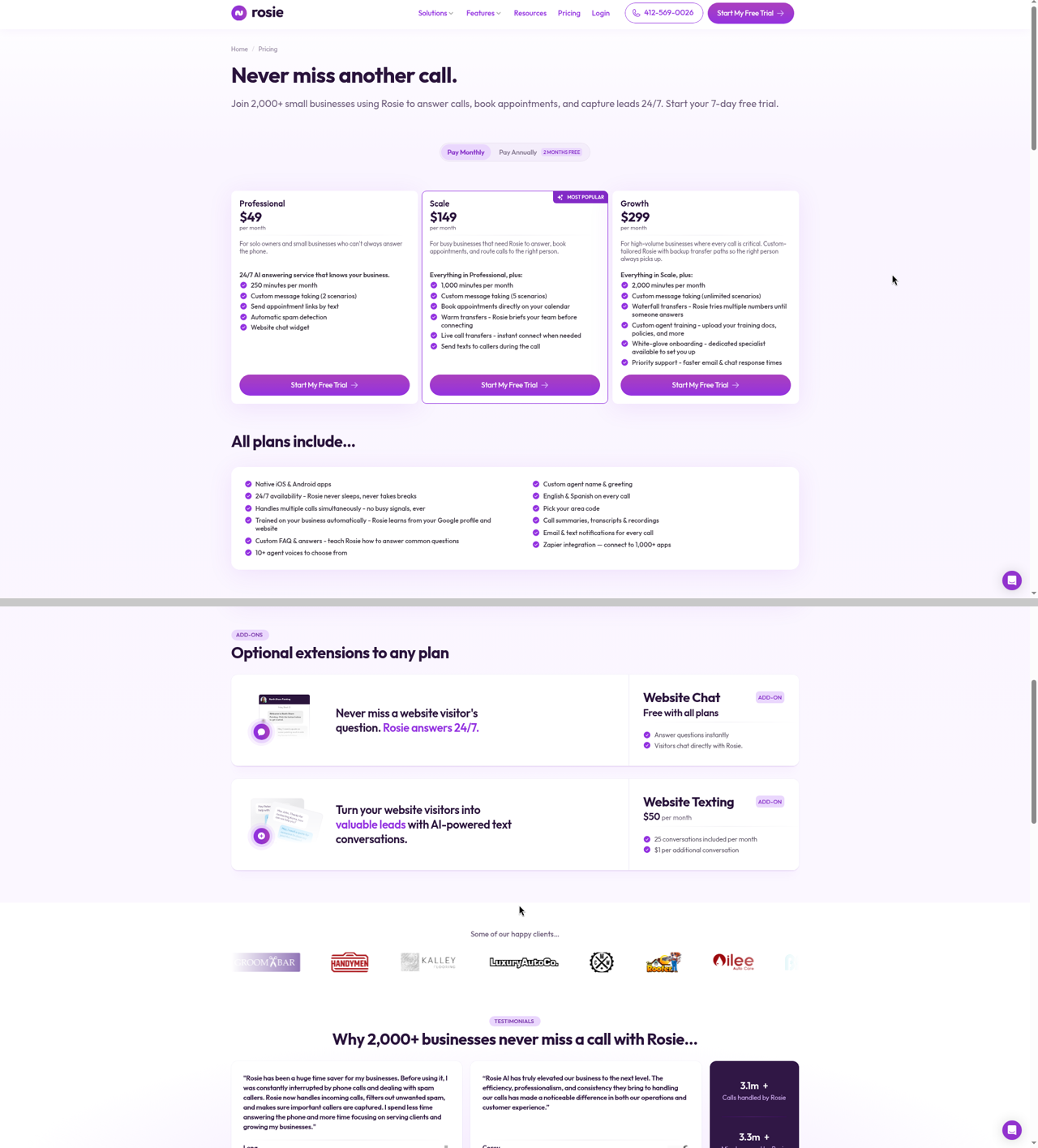
Rosie’s Professional plan is $49 a month for 250 minutes; Scale ($149, 1,000 minutes) adds calendar booking, warm and live transfers, and mid-call texting; Growth ($299, 2,000 minutes) adds waterfall transfers that try multiple numbers until someone answers — pricing verified October 13, 2026 (dated screenshot). “English & Spanish on every call” is listed in the all-plans column, which makes Rosie the cheapest documented bilingual answering on this page. The Housecall Pro story is thin, though: the official Zapier listing for Rosie + Housecall Pro exposes exactly one Housecall Pro action — Create Customer — with no job-creation action, so “booked the job in HCP” is not something this connection claims. One more gap to price in: Rosie’s pricing page doesn’t publish what happens when minutes run out, so ask about overage behavior in writing before a surge week asks for you.
Pricing for Rosie as captured on October 13, 2026. This screenshot is retaken every Friday at 9:00 AM ET and replaced whether the price has changed or not.
6. Smith.ai
Smith.ai’s AI receptionist starts free — 25 calls a month, $3.00 per call after — then Pro at $150 a month for 75 calls ($2.00 per call, extras $2.50) and Enterprise at $500 for 300, month to month — pricing verified October 13, 2026 (dated screenshot). Its Housecall Pro integration is labeled “Native,” and the documentation is the most specific on this page: inbound callers are mapped to existing or new client records, call summaries are logged to the account, and bookings run through your Housecall Pro online-booking link — only for services you’ve toggled “Book online” in your price list. Read the nuance before buying: the customer record and notes are written after the call, and the booking happens through the online-booking flow rather than a mid-call job write. That is still the deepest documented third-party HCP connection in this lineup. Spanish is handled when enabled — the AI detects whether the caller is speaking English or Spanish and continues in that language — and for the shop whose callers routinely need a live human mid-call, Smith.ai’s human backup is the honest pick.
Pricing for Smith.ai as captured on October 13, 2026. This screenshot is retaken every Friday at 9:00 AM ET and replaced whether the price has changed or not.
The four scripted calls: burst pipe, tune-up, “where is my tech,” and the price it must not invent
Documentation tells you what a vendor claims; a phone call tells you what it does. So the proof layer of this page is four scripted calls, run against every vendor’s demo line or trial with the same script, the same caller, and the same evening hour, graded pass / partial / fail on the five criteria with a note on what actually appeared in Housecall Pro — customer, job, appointment, notes, or nothing — timestamped against the call.
Status, said plainly: as of October 13, 2026, all six vendors are not test-called for this edition. We grade what documentation proves above; this protocol publishes now, licensed CC-BY like our HVAC five-call protocol, so any shop can run it themselves tonight — and when we complete our own runs, transcripts and grades land here with dates. Nothing below is a result; it is the test.
Call 1 — Burst pipe, 2 AM (plumbing), with a Spanish repeat
The caller: water is coming through the ceiling under an upstairs bathroom. Pass means safety and shut-off guidance comes first, the call is classified as an emergency, the on-call tech is paged or warm-transferred with context inside the call, and an emergency job or customer record shows up in Housecall Pro — timestamped against the call. Then the whole call runs a second time entirely in Spanish, address included. This is the call our full plumber comparison grades at the platform level; here the question is narrower: what landed in HCP, and did the Spanish run lose anything the English run had?
Call 2 — Routine booking (fall furnace tune-up)
An existing customer wants a fall furnace tune-up next week. Pass means the receptionist recognizes the existing customer, offers real open windows, books one, and the appointment appears in Housecall Pro during the call — without spawning a duplicate customer record. The duplicate check matters more than it sounds: post-call write paths that create-if-missing can split one customer into two records across a busy season.
Call 3 — “Where is my tech?”
A customer with a 1–4 PM window calls at 2:40. Pass means the answer comes from the appointment record — or at minimum the window is confirmed and a callback expectation is set — without opening a duplicate job. Message-takers fail this one by design; it’s the call that separates receptionists from answering machines.
Call 4 — The price question it must not invent
Two questions: one service that is in the price book (“What’s your drain-clearing price?”) and one that deliberately is not (“How much to replace a 50-gallon water heater?”). Pass means the configured price-book item is quoted exactly, and the missing item routes to an estimate — “a tech will confirm on site” — instead of a number. Any invented dollar figure is an automatic fail, full stop. We run this against a test Housecall Pro account with known price-book entries so any reader can check the answer against the source.
Test data, labeled as test data: the test account’s price book carries “Drain clearing — standard, $189” and “Furnace tune-up — seasonal, $129.” Neither is a real shop’s price; both exist so Call 4 has a ground truth. The water-heater and heat-pump questions are absent from the book on purpose.
Does the voice have to sound human? What the research says
Every criterion above is mechanical — a job exists in Housecall Pro or it doesn’t. This one is softer, and at 2 AM it may matter more than the other four combined, because a homeowner standing in water is not in a survey mood. CallRail’s 2025 survey of 1,000 US consumers found 78% have abandoned a business entirely over an unanswered call, 82% say they would call a competitor instead, and 21% call another business immediately, without waiting at all. Answering is step one. What answers is step two.
On that second step the published evidence points one way. SurveyMonkey’s December 2025 study of 2,017 Americans found 79% strongly prefer a human over an AI agent, and 52% say a human is less likely to frustrate them — frustration being the entire emotional state of an emergency call. And the one large field experiment on machine voices, published in Marketing Science (Luo, Tong, Fang, and Qu, 2019; more than 6,200 customers), found an undisclosed voice bot performed on par with proficient human agents — but when callers were told up front they were talking to a machine, 56.3% hung up within seconds and purchase rates fell 79.7%, even though audio analysis showed the bot was objectively as competent as the humans. The objection was perception, not performance.
Three honest caveats. The Marketing Science experiment ran outbound sales calls for one financial-services firm in 2019, not inbound plumbing emergencies in 2026. SurveyMonkey measures stated preference, not 2 AM behavior. Whether your customers react the same way is genuinely unknown — nobody has published that study for the trades. But every source leans the same direction: tolerance for a machine-sounding voice is lowest exactly when the stakes are highest, and a burst pipe or a dead furnace is as high as residential stakes get. Where state law requires disclosing that the agent is AI, the same experiment found a strong first minute before disclosure softens the drop — which is another way of saying the voice has to earn the call either way.
That is why Call 1 grades the voice and not just the write-path — and why voice realism is the engineering problem Futuro AI, as the publisher of this page, spends the most on. Don’t take our word for it: run the burst-pipe script above against our line and every competitor’s, once in English and once in Spanish, and grade what your ear tells you. The protocol is licensed CC-BY precisely so the ear test belongs to you.
What does your bill do in a freeze or heat week?
Every plan on this page is affordable in April. The question is February. Take a shop at 300 calls in a normal month and triple it in a freeze week: 900 calls, roughly three minutes each. Per-minute: Dialzara’s Elite covers 1,000 minutes, then bills $0.35 each — 2,700 talk minutes is about $944 before you’ve paid for November. Rosie’s Growth covers 2,000 minutes and — this is the problem — doesn’t publish its overage rate, so the surge bill is genuinely unknown. Per-call: Smith.ai’s Enterprise covers 300 calls; 600 extra at roughly $2.10–$2.50 each adds $1,260–$1,500. Per-caller: Goodcall’s Scale covers 2,000 unique customers, and freeze weeks bring repeat callers — who bill once — so its shape holds better than per-minute, though new-customer surges bill at 15¢ each over the cap. Flat: Futuro AI is $200 in the freeze week and $200 in the quiet week, and CSR AI’s sales-quoted add-on can’t be modeled at all until Housecall Pro quotes you. The broader heat-wave pricing math across nine vendors is in our full HVAC AI receptionist comparison; the Housecall Pro-specific version of the lesson is simpler: metered plans get expensive exactly when your techs are busiest, so either buy flat or buy a meter you’ve read.
What changes between plumbing and HVAC on the same Housecall Pro setup?
The platform configuration is identical — same price book, same online-booking link, same CSR AI toggle. What changes is the call mix. Plumbing skews emergency: the burst pipe at 2 AM is the expensive miss, so criterion two (the on-call page) carries the weight, and Call 1 is the test that matters. HVAC skews seasonal: the bookable tune-up and the July no-cool call dominate, so live booking (criterion one) and surge billing (criterion five) carry the weight, and Calls 2 and 4 are the tests that matter. Spanish cuts across both — if a meaningful share of your callers prefer it, criterion three’s “coming soon” and “not documented” cells in the table above are disqualifying no matter the trade. One setup, one rubric, two weightings — which is why this page serves both trades from one URL instead of pretending they’re different products.
Which one should you pick?
Eight situations, one answer each. Find yours.
If you want it to know your business already
Choose CSR AI. It reads your jobs, services, availability, and price book natively, with zero setup, and no third party on this page can honestly claim otherwise. Accept the sales-quoted price conversation and the coming-soon Spanish, and hold Housecall Pro to the booking contradiction by testing it yourself.
If you want a documented connection with humans behind it
Choose Smith.ai. The native integration, the online-booking flow, the post-call writes, and live receptionist backup are all documented in public, from a free 25-call tier to Pro at $150 and Enterprise at $500 a month. Per-call pricing is the trade you make for it.
If your callers speak Spanish and the budget is tight
Rosie at $49 puts English and Spanish on every call at the lowest bilingual entry here, and Dialzara’s $99 Pro adds after-hours escalation rules. Neither writes a job into Housecall Pro, so someone still retypes at 7 AM unless you build the Zapier path.
If your bill can’t spike when the weather does
That’s the shop we built Futuro for the trades for: $200 flat whether the freeze triples your calls or not, a full native Housecall Pro integration, 53 languages with per-turn switching, and price-book-only quoting. The honest cost is the highest entry price on this list, so low-volume shops should start cheaper.
If your calls are routine and mostly English
Goodcall’s per-caller billing is the most predictable meter on the list, because repeat customers are free, as long as undocumented Spanish and a self-built Zapier path to HCP fit your shop.
If most of your emergencies come after hours
Look at the after-hours path before the price. CSR AI has a separate after-hours escalation number with emergency handling always on, Dialzara adds after-hours rules from its $99 Pro tier, and Futuro AI pages the on-call tech with the full call context. Run Call 1 from the protocol above against each before you commit.
If you want a human to take over the hard calls
Smith.ai is the only option here with live North America-based receptionists behind the AI. Rosie offers warm and live transfers to your own team from its $149 Scale tier, which is a different thing: the human is still you.
If you are staying with a human answering service for now
Use the four scripted calls on this page as your test of whatever replaces it later, and price the surge week first. A per-call or per-minute plan that looks cheap in April is the one to model against February.
Frequently Asked Questions
It depends on the write-path you need. For zero-setup native knowledge of your jobs, services, and price book, Housecall Pro’s own CSR AI is the honest pick. For the deepest documented third-party connection with human backup, Smith.ai (free for 25 calls, Pro $150/mo, Enterprise $500/mo). For bilingual on every tier, Rosie (from $49). For flat-rate unlimited with a full native HCP integration, heavy voice realism, and 53 languages, Futuro AI ($200/mo). Prices verified October 13, 2026.
Yes — Smith.ai labels the integration “Native” on its Housecall Pro integration page. Per its documentation, inbound callers are mapped to existing or new client records, call summaries are logged to the account, and bookings run through your Housecall Pro online-booking link — only for services toggled “Book online” in your price list. The writes happen after the call, not mid-call. Pricing runs from a free 25-call tier ($3 per call after) to Pro at $150 a month for 75 calls and Enterprise at $500 for 300, verified October 14, 2026.
When the only requirement is that the receptionist already knows your price book, services, and technician availability with zero setup, yes — choose CSR AI. The trade-offs: pricing is sales-quoted rather than published, its help center lists Spanish conversation capabilities as coming soon (checked October 13, 2026), and its own documentation contradicts itself on whether live booking is available yet.
Documented answer, by vendor: CSR AI has “Book jobs and estimates” permissions natively. Smith.ai creates and maps customer records and logs bookings made through your online-booking link after each call. Rosie’s Zapier connection exposes only a Create Customer action — no job creation. Dialzara and Goodcall reach Housecall Pro through general Zapier or Make workflows. Futuro AI’s full native integration is live and tested with active client accounts.
Yes, with differences. CSR AI offers a separate after-hours escalation number with emergency handling always on (forward or text alert). Dialzara includes after-hours rules and escalation from its $99 Pro tier. Rosie adds warm and live transfers at $149 and waterfall transfers — trying multiple numbers until someone answers — at $299. Futuro AI pages the on-call tech with full call context as part of its configured workflow.
It can, unless constrained to your price book. CSR AI’s Customization tab lets you define how it handles pricing questions, and it reads your actual Housecall Pro price book. Futuro AI’s MasterMind retrieval quotes only from your price book and says “a tech will confirm on site” otherwise. Any receptionist pricing from general training can invent a number — our Call 4 protocol tests exactly that.
Metered plans rise with volume: per-minute plans (Dialzara, Rosie) bill overage, per-call plans (Smith.ai) bill each extra call, per-caller plans (Goodcall) bill each extra customer. Flat plans don’t move — Futuro AI is $200 whether a freeze triples your calls or not. Check the failure mode too: on Dialzara, callers hit voicemail if minutes reach zero without auto-recharge.
Yes — Futuro AI has a full native Housecall Pro integration, live and tested with active client accounts and switched on during the managed 24–48-hour onboarding. Your price book, services, and escalation rules are loaded so the agent quotes only from the book. The plan is $200 a month flat for unlimited inbound calls, in 53 languages.
How did we verify this? Methodology and evidence level
Verification. Every price, feature, and integration claim was read from the vendor’s own live pages, help centers, or official integration listings on October 13, 2026, and the date is printed wherever a number appears. Vendor pricing screenshots live on our vendor pricing index and are retaken every Friday at 9:00 AM ET whether the price changed or not.
The four calls. The protocol above is the whole test: same script, same caller, same evening hour, graded pass / partial / fail on the five criteria, with what appeared in Housecall Pro — customer, job, appointment, notes, or nothing — timestamped against each call. The test Housecall Pro account’s price-book entries ($189 drain clearing, $129 furnace tune-up) are printed in Call 4 and labeled as test data. As of October 13, 2026, no vendor in this lineup has been test-called for this edition; each is labeled “not test-called,” and transcripts with grades will be inserted with dates when the runs complete. The protocol is licensed CC-BY.
What we did not do. No load testing of concurrency. No independent voice benchmark. No vendor input, preview, or paid placement — Housecall Pro did not see this page before you did. Housecall Pro’s help documents contradict themselves on whether CSR AI booking is live, so we graded what the documentation shows and flagged the contradiction rather than resolving it in anyone’s favor.
Rubric. Five criteria, weighted before any vendor was profiled: live HCP job creation 30%, after-hours paging 20%, price-book-only quoting 20%, Spanish 15%, surge-week billing 15%. Vendors are assessed pass / partial / fail with notes; no scores are published.
Conflicts. Futuro Corporation publishes this page and sells one of the six receptionists in it. The disclosure sits at the top of the article, the rubric weights were fixed before profiles were written, and Futuro’s own entry carries the same honest-trade-off block as every other vendor — including the places a competitor is the honest pick.
Price sources, by vendor: Dialzara · Futuro AI · Goodcall · Housecall Pro (CSR AI add-on price not published) · Rosie · Smith.ai — all checked October 13, 2026.
Corrections: pricing changes and features ship. If something here is wrong, our corrections policy commits to a fix, and editorial@futurocorp.com reaches a human who re-verifies on every report.
What did we not test?
Two vendors from Housecall Pro’s own roundup don’t appear as profiles: Ruby is human-first rather than an AI receptionist, and Quo’s Sona is a phone-system add-on (10 calls on the free tier, from $25 for 40, credit-billed) that its own reviewer notes doesn’t create jobs or use FSM scheduling rules natively — so neither belongs in a Housecall Pro write-path comparison. Beyond that: we did not test call quality hands-on for this edition (the protocol above is the fix), we did not test the Zapier paths end-to-end into a live HCP account, we can’t model CSR AI’s price because Housecall Pro doesn’t publish one, and Goodcall’s Spanish capability is undocumented rather than confirmed absent — the vendor may support it without saying so on the pages we checked. Where a page has changed since October 13, 2026, the linked page is the authority.